Week4 Lab Tutorial Timeline
Time |
Activity |
|---|---|
16:00–16:05 |
Introduction — Overview of the main tasks for the lab tutorials |
16:05–16:45 |
Tutorial: Spatial patterns 1 — Follow Section 4.1-4.2 of the Jupyter Notebook to practice the spatial weights and global spatial autocorrelation |
16:45–17:30 |
Tutorial: Spatial patterns 2 — Follow Section 4.3-4.4 of the Jupyter Notebook to practice the local spatial autocorrelation and KDE |
17:30–17:55 |
Quiz — Complete quiz tasks |
17:55–18:00 |
Wrap-up — Recap key points and address final questions |
For this module’s lab tutorials, you can download all the required data using the provided link (click).
Please make sure that both the Jupyter Notebook file and the data and img folder are placed in the same directory (specifically within the STBDA_lab folder) to ensure the code runs correctly.
Week 4 Key Takeaways:
Understand the concept of spatial dependence and spatial autocorrelation.
Compute spatial weights using different methods.
Compute global spatial autocorrelation using Moran’s I.
Compute local spatial autocorrelation using Local Moran’s I and Getis-Ord Gi*.
Implement Kernel Density Estimation (KDE) to visualize spatial patterns.
4 Spatial patterns analysis#
Spatial dependence is the phenomenon where the value of a variable at one location is influenced by the values of the same variable at nearby or neighboring locations (Near things are more related than distant things.— based on Tobler’s First Law of Geography).
If spatial data are sampled at nearby locations, they tend to be correlated with one another. In other words, Spatial dependence is a fundamental concept in spatial analysis and is often quantified using measures of spatial autocorrelation.
The phenomena of spatial dependence can be observed in the real world, for example, the population density of a city is likely to be similar in nearby neighborhoods, but different in neighborhoods that are far apart; or the rainfall in a region is likely to be similar in nearby areas, but different in areas that are far apart.
Autocorrelation is the correlation of a variable (or series) with itself.
Spatial autocorrelation is a statistical measure of the degree to which spatial dependence exists in the data. It’s a quantified outcome that shows how strongly (and in what way) spatial dependence appears. It can be positive (similar values are clustered together), negative (dissimilar values are clustered together), or zero (no spatial pattern).
4.1 Spatial Weights#
A spatial weight matrix (spatial adjacency matrix) \(W\) is a square matrix that quantifies the spatial relationship between each pair of locations (\(i\) and \(j\) are the spatial unit index) across \(n\) spatial units:
\(w_{ij}\) is the spatial weight between location \(i\) and \(j\);
Typically, \(w_{ii} = 0\) (no self-weight).
For example, if we have 4 areas/locations (A, B, C, D) with the index (1, 2, 3, 4) and the following spatial weight matrix can be \(W\): $$ W =
$$
How to compute the spatial weigt \(w_{i,j}\): we can list a tabel to show the different types of computing the spatial weight \(w_{i,j}\):
Type of spatial weight |
Description |
Formula |
Value type |
|---|---|---|---|
Contiguity (Queen) |
Based on the adjacency of spatial units |
\(w_{i,j} = 1\) if \(i\) and \(j\) are neighbors (for polygons, neighbors share an edge or corner), else \(0\) |
Binary |
Contiguity (Rook) |
Based on the adjacency of spatial units |
\(w_{i,j} = 1\) if \(i\) and \(j\) are neighbors (for polygons, neighbors share only an edge), else \(0\) |
Binary |
Distance |
Based on the distance between spatial units |
\(w_{i,j} = \frac{1}{d_{i,j}}\) if \(d_{i,j} < d_{threshold}\), else \(0\) |
Binary |
K-nearest neighbors |
Based on the distance to the \(k\) nearest neighbors |
\(w_{i,j} = 1\) if \(j\) is one of the \(k\) nearest neighbors of \(i\), else \(0\) |
Binary |
Inverse distance |
Based on the inverse of the distance between spatial units |
\(w_{i,j} = \frac{1}{d_{i,j}^k}\) if \(d_{i,j} < d_{threshold}\), else \(0\) |
Continuous |
Row-standardized |
Based on the row-standardization of the spatial weight matrix |
\(w_{i,j} = \frac{w_{i,j}}{\sum_j w_{i,j}}\) |
Continuous |
Column-standardized |
Based on the column-standardization of the spatial weight matrix |
\(w_{i,j} = \frac{w_{i,j}}{\sum_i w_{i,j}}\) |
Continuous |
Symmetric |
Based on the symmetric standardization of the spatial weight matrix |
\(w_{i,j} = \frac{w_{i,j}}{\sum_i w_{i,j} + \sum_j w_{i,j}}\) |
Continuous |
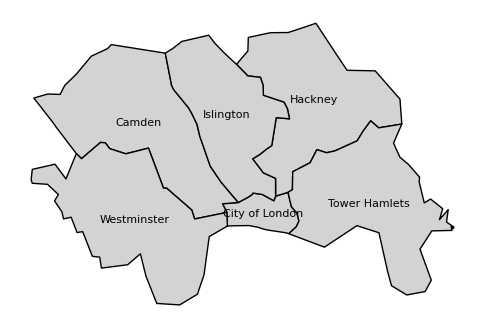
Now, we use the libpysal library to compute the spatial weights for selected central London boroughs/LAs (polygons).
# Import the required libraries
import geopandas as gpd
import libpysal.weights as weights
import matplotlib.pyplot as plt
import contextily as cx
import pandas as pd
import warnings

from spreg import white

warnings.filterwarnings("ignore")
# read the shapefile
gdf_uk_la = gpd.read_file('data/Local_Authority_Districts_December_2024_Boundaries_UK_BSC.geojson')
list_las_c_london = ['Camden', 'Hackney', 'Islington', 'Tower Hamlets', 'City of London', 'Westminster']
# Filter the GeoDataFrame to include only the inner London boroughs
gdf_c_london = gdf_uk_la[gdf_uk_la['LAD24NM'].isin(list_las_c_london)]
# transform the CRS to EPSG:27700 (British National Grid)
gdf_c_london = gdf_c_london.to_crs(epsg=27700)
gdf_c_london
| FID | LAD24CD | LAD24NM | LAD24NMW | BNG_E | BNG_N | LONG | LAT | GlobalID | geometry | |
|---|---|---|---|---|---|---|---|---|---|---|
| 263 | 264 | E09000001 | City of London | 532382 | 181358 | -0.09352 | 51.51564 | 741710fd-03e1-4b41-8645-7ebcfc5961ac | POLYGON ((533404.882 182037.774, 533534.125 18... | |
| 269 | 270 | E09000007 | Camden | 527491 | 184283 | -0.16291 | 51.54305 | 88f3f650-53ac-434d-883e-6235b48d14c4 | POLYGON ((529150.075 185862.023, 529701.341 18... | |
| 274 | 275 | E09000012 | Hackney | 534560 | 185787 | -0.06046 | 51.55493 | a41cf0fc-95ed-4823-a9db-7b8bc60f421b | POLYGON ((537570.535 185494.637, 537638.712 18... | |
| 281 | 282 | E09000019 | Islington | 531160 | 184645 | -0.10990 | 51.54547 | 43a872fc-e401-45af-a2e6-3b2befc98837 | POLYGON ((533382.221 185149.793, 533460.932 18... | |
| 292 | 293 | E09000030 | Tower Hamlets | 536340 | 181452 | -0.03648 | 51.51555 | 54f82e61-dc15-42cb-b777-681b4326f855 | POLYGON ((536480.759 184698.334, 536779.206 18... | |
| 295 | 296 | E09000033 | Westminster | 528268 | 180871 | -0.15295 | 51.51222 | a52ff0f8-4ac0-4417-8338-01be3cbb516a | POLYGON ((526773.283 183663.262, 527373.359 18... |
# plot the inner London boroughs
fig, ax = plt.subplots(figsize=(6, 6))
gdf_c_london.plot(ax=ax, color='lightgrey', edgecolor='black')
# set each name for the borough
for x, y, label in zip(gdf_c_london.geometry.centroid.x, gdf_c_london.geometry.centroid.y, gdf_c_london['LAD24NM']):
    ax.text(x, y, label, fontsize=8, ha='center', va='center')
ax.axis('off')
plt.show()
# set the index to the LAD24NM column
gdf_c_london.index = gdf_c_london['LAD24NM']
gdf_c_london.index
Index(['City of London', 'Camden', 'Hackney', 'Islington', 'Tower Hamlets',
       'Westminster'],
      dtype='object', name='LAD24NM')
Contiguity – Queen method
# Compute the spatial weights using the Queen contiguity method
w_q = weights.Queen.from_dataframe(gdf_c_london, use_index='True')
# the numbers of units
print('the numbers of units', w_q.n)
the numbers of units 6
# print the spatial weights df
df_wq = w_q.to_adjlist(drop_islands=True)
df_wq
| focal | neighbor | weight | |
|---|---|---|---|
| 0 | City of London | Camden | 1.0 |
| 1 | City of London | Hackney | 1.0 |
| 2 | City of London | Islington | 1.0 |
| 3 | City of London | Tower Hamlets | 1.0 |
| 4 | City of London | Westminster | 1.0 |
| 5 | Camden | City of London | 1.0 |
| 6 | Camden | Islington | 1.0 |
| 7 | Camden | Westminster | 1.0 |
| 8 | Hackney | City of London | 1.0 |
| 9 | Hackney | Islington | 1.0 |
| 10 | Hackney | Tower Hamlets | 1.0 |
| 11 | Islington | City of London | 1.0 |
| 12 | Islington | Camden | 1.0 |
| 13 | Islington | Hackney | 1.0 |
| 14 | Tower Hamlets | City of London | 1.0 |
| 15 | Tower Hamlets | Hackney | 1.0 |
| 16 | Westminster | City of London | 1.0 |
| 17 | Westminster | Camden | 1.0 |
# we can transfer the spatial weights list (df_wq) to spatial weight/adjacency matrix in pandas
df_wq_matrix = df_wq.pivot(index='focal', columns='neighbor', values='weight').fillna(0)
df_wq_matrix
| neighbor | Camden | City of London | Hackney | Islington | Tower Hamlets | Westminster |
|---|---|---|---|---|---|---|
| focal | ||||||
| Camden | 0.0 | 1.0 | 0.0 | 1.0 | 0.0 | 1.0 |
| City of London | 1.0 | 0.0 | 1.0 | 1.0 | 1.0 | 1.0 |
| Hackney | 0.0 | 1.0 | 0.0 | 1.0 | 1.0 | 0.0 |
| Islington | 1.0 | 1.0 | 1.0 | 0.0 | 0.0 | 0.0 |
| Tower Hamlets | 0.0 | 1.0 | 1.0 | 0.0 | 0.0 | 0.0 |
| Westminster | 1.0 | 1.0 | 0.0 | 0.0 | 0.0 | 0.0 |
# we can use .neighbors to get the neighbors of each unit
w_q.neighbors['Camden']
['Westminster', 'Islington', 'City of London']
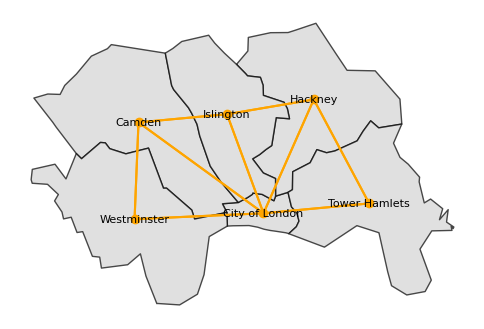
We can also plot the spatial weights using a network/graph representation, where the nodes represent the spatial units and the edges represent the spatial weights, here, if the two units are neighbors, the edge is drawn between them.
#plot the spatial weights using a network/graph representation
fig, ax = plt.subplots(figsize=(6, 6))
gdf_c_london.plot(ax=ax, color='lightgrey', edgecolor='black', alpha=0.7)
# set each name for the borough
for x, y, label in zip(gdf_c_london.geometry.centroid.x, gdf_c_london.geometry.centroid.y, gdf_c_london['LAD24NM']):
    ax.text(x, y, label, fontsize=8, ha='center', va='center')
ax.axis('off')
w_q.plot(gdf_c_london, ax=ax, color='orange')
plt.show()
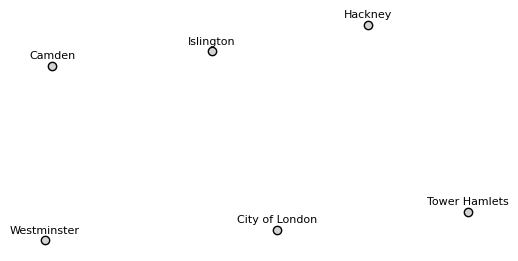
Distance-based spatial weights are based on the distance between spatial units, usually, the point locations. So, we transform the polygons to points (centroids) and then compute the distance-based spatial weights.
# transform the polygons to points (centroids)
gdf_c_london['geometry'] = gdf_c_london.geometry.centroid
# now six LAs are represented by their centroids/points
gdf_c_london
| FID | LAD24CD | LAD24NM | LAD24NMW | BNG_E | BNG_N | LONG | LAT | GlobalID | geometry | |
|---|---|---|---|---|---|---|---|---|---|---|
| LAD24NM | ||||||||||
| City of London | 264 | E09000001 | City of London | 532382 | 181358 | -0.09352 | 51.51564 | 741710fd-03e1-4b41-8645-7ebcfc5961ac | POINT (532493.308 181259.574) | |
| Camden | 270 | E09000007 | Camden | 527491 | 184283 | -0.16291 | 51.54305 | 88f3f650-53ac-434d-883e-6235b48d14c4 | POINT (527843.276 184641.457) | |
| Hackney | 275 | E09000012 | Hackney | 534560 | 185787 | -0.06046 | 51.55493 | a41cf0fc-95ed-4823-a9db-7b8bc60f421b | POINT (534363.476 185492.867) | |
| Islington | 282 | E09000019 | Islington | 531160 | 184645 | -0.10990 | 51.54547 | 43a872fc-e401-45af-a2e6-3b2befc98837 | POINT (531135.378 184944.643) | |
| Tower Hamlets | 293 | E09000030 | Tower Hamlets | 536340 | 181452 | -0.03648 | 51.51555 | 54f82e61-dc15-42cb-b777-681b4326f855 | POINT (536424.392 181625.502) | |
| Westminster | 296 | E09000033 | Westminster | 528268 | 180871 | -0.15295 | 51.51222 | a52ff0f8-4ac0-4417-8338-01be3cbb516a | POINT (527697.219 181041.502) |
# plot the centroids of the inner London boroughs
fig, ax = plt.subplots(figsize=(6, 6))
gdf_c_london.plot(ax=ax, color='lightgrey', edgecolor='black')
# set each name for the borough
for x, y, label in zip(gdf_c_london.geometry.x, gdf_c_london.geometry.y, gdf_c_london['LAD24NM']):
    ax.text(x, y+200, label, fontsize=8, ha='center', va='center')
ax.axis('off')
plt.show()
# Compute the spatial weights using the distance-based method, the threshold with 5000 means 5000 meters as the CRS is EPSG:27700
w_d = weights.DistanceBand.from_dataframe(gdf_c_london, threshold=5000, binary=True, use_index='True')
df_wd = w_d.to_adjlist(drop_islands=True)
df_wd
| focal | neighbor | weight | |
|---|---|---|---|
| 0 | City of London | Hackney | 1.0 |
| 1 | City of London | Islington | 1.0 |
| 2 | City of London | Tower Hamlets | 1.0 |
| 3 | City of London | Westminster | 1.0 |
| 4 | Camden | Islington | 1.0 |
| 5 | Camden | Westminster | 1.0 |
| 6 | Hackney | City of London | 1.0 |
| 7 | Hackney | Islington | 1.0 |
| 8 | Hackney | Tower Hamlets | 1.0 |
| 9 | Islington | City of London | 1.0 |
| 10 | Islington | Camden | 1.0 |
| 11 | Islington | Hackney | 1.0 |
| 12 | Tower Hamlets | City of London | 1.0 |
| 13 | Tower Hamlets | Hackney | 1.0 |
| 14 | Westminster | City of London | 1.0 |
| 15 | Westminster | Camden | 1.0 |
df_wd_matrix = df_wd.pivot(index='focal', columns='neighbor', values='weight').fillna(0)
df_wd_matrix
| neighbor | Camden | City of London | Hackney | Islington | Tower Hamlets | Westminster |
|---|---|---|---|---|---|---|
| focal | ||||||
| Camden | 0.0 | 0.0 | 0.0 | 1.0 | 0.0 | 1.0 |
| City of London | 0.0 | 0.0 | 1.0 | 1.0 | 1.0 | 1.0 |
| Hackney | 0.0 | 1.0 | 0.0 | 1.0 | 1.0 | 0.0 |
| Islington | 1.0 | 1.0 | 1.0 | 0.0 | 0.0 | 0.0 |
| Tower Hamlets | 0.0 | 1.0 | 1.0 | 0.0 | 0.0 | 0.0 |
| Westminster | 1.0 | 1.0 | 0.0 | 0.0 | 0.0 | 0.0 |
Inverse distance method
Compute the spatial weights using the inverse distance-based method, we need to set the binary parameter to False to get the continuous weights, then the weights are computed with a parameter alpha which is the power of the distance, if we set alpha = -1, then the weights are computed as \(w_{i,j} = \frac{1}{d_{i,j}}\).
alpha: distance decay parameter for weight (default -1.0) if alpha is positive the weights will not decline with distance.
# Compute the spatial weights using the inverse distance-based method, the threshold with 5000 means 5000 meters as the CRS is EPSG:27700
w_inverse_d = weights.DistanceBand.from_dataframe(gdf_c_london, threshold=5000, binary=False, alpha= -1, use_index='True')
df_w_in_d = w_inverse_d.to_adjlist(drop_islands=True)
df_w_in_d
| focal | neighbor | weight | |
|---|---|---|---|
| 0 | City of London | Hackney | 0.000216 |
| 1 | City of London | Islington | 0.000255 |
| 2 | City of London | Tower Hamlets | 0.000253 |
| 3 | City of London | Westminster | 0.000208 |
| 4 | Camden | Islington | 0.000302 |
| 5 | Camden | Westminster | 0.000278 |
| 6 | Hackney | City of London | 0.000216 |
| 7 | Hackney | Islington | 0.000305 |
| 8 | Hackney | Tower Hamlets | 0.000228 |
| 9 | Islington | City of London | 0.000255 |
| 10 | Islington | Camden | 0.000302 |
| 11 | Islington | Hackney | 0.000305 |
| 12 | Tower Hamlets | City of London | 0.000253 |
| 13 | Tower Hamlets | Hackney | 0.000228 |
| 14 | Westminster | City of London | 0.000208 |
| 15 | Westminster | Camden | 0.000278 |
df_w_in_d_matrix = df_w_in_d.pivot(index='focal', columns='neighbor', values='weight').fillna(0)
df_w_in_d_matrix
| neighbor | Camden | City of London | Hackney | Islington | Tower Hamlets | Westminster |
|---|---|---|---|---|---|---|
| focal | ||||||
| Camden | 0.000000 | 0.000000 | 0.000000 | 0.000302 | 0.000000 | 0.000278 |
| City of London | 0.000000 | 0.000000 | 0.000216 | 0.000255 | 0.000253 | 0.000208 |
| Hackney | 0.000000 | 0.000216 | 0.000000 | 0.000305 | 0.000228 | 0.000000 |
| Islington | 0.000302 | 0.000255 | 0.000305 | 0.000000 | 0.000000 | 0.000000 |
| Tower Hamlets | 0.000000 | 0.000253 | 0.000228 | 0.000000 | 0.000000 | 0.000000 |
| Westminster | 0.000278 | 0.000208 | 0.000000 | 0.000000 | 0.000000 | 0.000000 |
This distance-based with band/ thereshold of 5000 meters means that if the distance between two units is less than 5000 meters, then they are neighbors. This brings us a different spatial weight matrix compared to the contiguity queen method. When we check the neighbors of Camden in the distance-based method, only Islinton and Westminster points are its neighbors as they are within 5000 meters to the point of Camden.
w_d.neighbors['Camden']
['Islington', 'Westminster']
Note that there are lots of different ways to compute the spatial weights based on different data formats (not only the GeoDataframe). you can find some other functions in the libpysal library in this Page (click) and a general tutorial.
4.2 Global Spatial Autocorrelation#
Global spatial autocorrelation answers the question: Is there overall clustering across the whole map?
Global Moran’s I :
Moran’s I (Moran, 1950) is a measure of global spatial autocorrelation. It is a single value that summarizes the degree of spatial autocorrelation in the entire dataset:
Where:
\( n \): Number of spatial units
\( x_i \): Value at location \( i \)
\( \bar{x} \): Mean of the variable
\( w_{ij} \): Spatial weight between location \( i \) and \( j \)
\( W = \sum_i \sum_j w_{ij} \): Sum of all spatial weights
\(I > 0\): Positive spatial autocorrelation.
\(I < 0\): Negative spatial autocorrelation.
\(I = 0\): No spatial autocorrelation.
# Import the required libraries
import esda
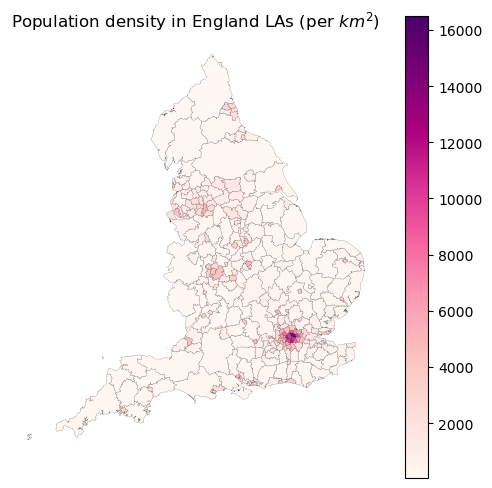
Now, we will use the England LA with population data to compute the global Moran’s I for population density.
# the population data is in the `data` folder
df_pop = gpd.read_file('data/populaiton_2022_all_ages_uk.csv')
# merge the population data with the GeoDataFrame
gdf_uk_la_pop = pd.merge(gdf_uk_la, df_pop, left_on='LAD24CD', right_on='Code', how='left')
# select the england LAs
gdf_england_la_pop = gdf_uk_la_pop[gdf_uk_la_pop['LAD24CD'].str.startswith('E')]
# transform the CRS to EPSG:27700 (British National Grid)
gdf_england_la_pop = gdf_england_la_pop.to_crs(epsg=27700)
# rename the columns
gdf_england_la_pop = gdf_england_la_pop.rename(columns={'All ages': 'Population'})
gdf_england_la_pop['Population'] = gdf_england_la_pop['Population'].astype('int')
# calculate the population density: population per square kilometer
gdf_england_la_pop['Population_density'] = gdf_england_la_pop.apply(lambda x: x['Population']/ (x.geometry.area/1000000), axis=1)
gdf_england_la_pop
| FID | LAD24CD | LAD24NM | LAD24NMW | BNG_E | BNG_N | LONG | LAT | GlobalID | geometry | Code | Name | Geography | Population | Population_density | |
|---|---|---|---|---|---|---|---|---|---|---|---|---|---|---|---|
| 0 | 1 | E06000001 | Hartlepool | 447161 | 531473 | -1.27017 | 54.67613 | fcc85d99-da7a-440c-aa80-b6e2a5353efe | POLYGON ((447851.213 537036.01, 448290.115 536... | E06000001 | Hartlepool | Unitary Authority | 93861 | 994.428583 | |
| 1 | 2 | E06000002 | Middlesbrough | 451141 | 516887 | -1.21100 | 54.54468 | 0d2753c9-b44b-44e2-9b20-f70fd8a63e1a | POLYGON ((450791.114 520932.509, 450530.512 52... | E06000002 | Middlesbrough | Unitary Authority | 148285 | 2735.466726 | |
| 2 | 3 | E06000003 | Redcar and Cleveland | 464330 | 519596 | -1.00657 | 54.56752 | 91793ade-9ca5-46dc-8591-7bd7fb61b233 | POLYGON ((456987.212 526324.904, 459206.816 52... | E06000003 | Redcar and Cleveland | Unitary Authority | 137175 | 561.248283 | |
| 3 | 4 | E06000004 | Stockton-on-Tees | 444940 | 518179 | -1.30665 | 54.55688 | ae16dbb0-8ebe-49c6-bff9-f3479669fd4f | POLYGON ((445378.413 526449.708, 445536.511 52... | E06000004 | Stockton-on-Tees | Unitary Authority | 199966 | 976.155131 | |
| 4 | 5 | E06000005 | Darlington | 428029 | 515648 | -1.56836 | 54.53534 | f21d0ade-ae2f-4bff-9d85-1048cd649b5f | POLYGON ((423240.211 524970.902, 423783.816 52... | E06000005 | Darlington | Unitary Authority | 109469 | 553.554052 | |
| ... | ... | ... | ... | ... | ... | ... | ... | ... | ... | ... | ... | ... | ... | ... | ... |
| 291 | 292 | E09000029 | Sutton | 527357 | 163639 | -0.17227 | 51.35755 | 1b5d57bc-1cb5-43e1-85ba-3bb45da0b7cc | POLYGON ((527423.64 167442.817, 527757.283 167... | E09000029 | Sutton | London Borough | 210053 | 4757.046484 | |
| 292 | 293 | E09000030 | Tower Hamlets | 536340 | 181452 | -0.03648 | 51.51555 | 54f82e61-dc15-42cb-b777-681b4326f855 | POLYGON ((536480.759 184698.334, 536779.206 18... | E09000030 | Tower Hamlets | London Borough | 325789 | 16494.761141 | |
| 293 | 294 | E09000031 | Waltham Forest | 537328 | 190278 | -0.01880 | 51.59462 | 97cd624f-2c02-4f12-a78e-7aedc777673f | POLYGON ((539923.888 193889.058, 539562.889 19... | E09000031 | Waltham Forest | London Borough | 275887 | 7119.047670 | |
| 294 | 295 | E09000032 | Wandsworth | 525152 | 174138 | -0.20022 | 51.45240 | 9c51587a-4315-449d-bcc7-e65625e402f7 | POLYGON ((528637.184 175213.943, 528758.922 17... | E09000032 | Wandsworth | London Borough | 329035 | 9499.579457 | |
| 295 | 296 | E09000033 | Westminster | 528268 | 180871 | -0.15295 | 51.51222 | a52ff0f8-4ac0-4417-8338-01be3cbb516a | POLYGON ((526773.283 183663.262, 527373.359 18... | E09000033 | Westminster | London Borough | 211365 | 9843.368835 |
296 rows × 15 columns
# plot the population data
fig, ax = plt.subplots(figsize=(6, 6))
gdf_england_la_pop.plot(column='Population_density', ax=ax, legend=True, cmap='RdPu', edgecolor='black', linewidth=0.1)
ax.axis('off')
plt.title('Population density in England LAs (per $km^2$)')
plt.show()
# compute the spatial weights using the Queen contiguity method
w_england_la_pop = weights.Queen.from_dataframe(gdf_england_la_pop, use_index='True')
# print the islands
for i in w_england_la_pop.islands:
    print(gdf_england_la_pop.loc[i, 'LAD24NM'])
Isle of Wight
Isles of Scilly
# compute the global Moran's I
mi = esda.Moran(gdf_england_la_pop['Population_density'], w_england_la_pop, two_tailed=True)
('WARNING: ', 43, ' is an island (no neighbors)')
('WARNING: ', 49, ' is an island (no neighbors)')
print('Moran\'s I:', mi.I)
print('p-value:', mi.p_sim)
Moran's I: 0.6242014303262433
p-value: 0.001
Interpretation of the Moran’s I: the result of the Moran’s I is 0.62, which indicates a positive spatial autocorrelation, meaning that the population density in England LAs is Strongly clustered together. The p-value is under 0.05, which indicates that the result is statistically significant at the 0.05 level. We can use the mi.sim to get the distribution of the Moran’s I under the null hypothesis of no spatial autocorrelation.
You can find more details about the Moran’s I in the libpysal Moran documentation.
4.3 Local Spatial Autocorrelation / Association#
Local spatial autocorrelation answers the questions: Is there clustering in a specific area? Which specific areas are clustered or are spatial outlier?
LISA (Local Indicators of Spatial Association) is a statistical technique that decomposes global spatial autocorrelation measures into location-specific contributions. It identifies significant spatial clusters or spatial outliers by measuring the correlation between a location and its neighbors.
Key aspects of LISA:
Helps identify local patterns of spatial association (clusters and outliers)
Indicates areas with significant high or low values
Shows locations with similar or dissimilar values among neighbors
Common LISA statistics include Local Moran’s I and Getis-Ord Gi*
Useful for finding hot spots, cold spots, and spatial outliers
Can be visualized through significance maps and cluster maps
4.3.1 Local Moran’s I#
Local Moran’s I is a measure of local spatial autocorrelation. It is a value for each spatial unit that summarizes the degree of spatial autocorrelation in the local neighborhood of that unit:
Where:
\( I_i \): Local Moran’s I for location \( i \) , (\( I_i \in (-\infty, +\infty) \))
\( x_i \): Value at location \( i \)
\( \bar{x} \): Mean of the variable
\( S\): Standard deviation of the variable
\( S^2 \): Variance of the variable
\( w_{ij} \): Spatial weight between location \( i \) and \( j \)
\( j \): Neighbors of location \( i \)
Interpretation:
\( I_i > 0 \): Positive spatial autocorrelation (high values surrounded by high values or low values surrounded by low values)
\(I_i < 0 \): Negative spatial autocorrelation (high values surrounded by low values or low values surrounded by high values)
\(I_i = 0 \): No spatial autocorrelation
We continue to use the England LA with population data to compute the local Moran’s I.
# compute the local Moran's I
lm = esda.Moran_Local(gdf_england_la_pop['Population_density'], w_england_la_pop)
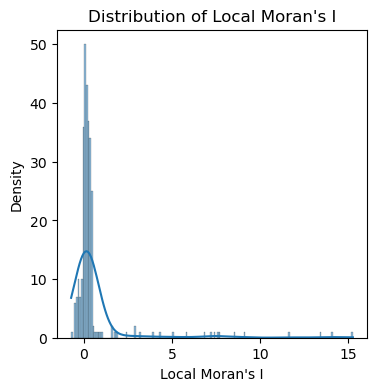
Note that the local Moran’s I is a distribution of values, not a single value like the global Moran’s I. The local Moran’s I can be used to identify the spatial clusters and outliers in the data.
# plot the distribution of local Moran's I using histogram and kde by seaborn
import seaborn as sns
fig, ax = plt.subplots(figsize=(4, 4))
sns.histplot(lm.Is, kde=True, ax=ax)
ax.set_xlabel('Local Moran\'s I')
ax.set_ylabel('Density')
ax.set_title('Distribution of Local Moran\'s I')
plt.show()
For a better visualization, we should set the vmin and vmax in gdf.plot() to the min and max of the local Moran’s I value for building the colormap.
This can make sure that the 0 is at the middle of the diverging colormap showing while color, and the color is symmetric to show the positive and negative values.
# mapping the local Moran's I
gdf_england_la_pop['local_moran'] = lm.Is
gdf_england_la_pop['p_value'] = lm.p_sim
gdf_england_la_pop['local_moran'] = gdf_england_la_pop['local_moran'].astype('float')
gdf_england_la_pop['local_moran'] = gdf_england_la_pop['local_moran'].fillna(0)
# plot the local Moran's I
fig, ax = plt.subplots(figsize=(8, 8))
# set the area with p values >=0.05 as the white
gdf_england_la_pop[~(gdf_england_la_pop['p_value'] < 0.05)].plot(ax=ax,color='white',edgecolor='black',linewidth=0.05)
# set the area with p values <0.05 with cmap
gdf_england_la_pop[gdf_england_la_pop['p_value'] < 0.05].plot(column='local_moran', ax=ax, legend=True,
                        cmap='seismic',
                        vmin=-15, vmax=15, # set the vmin and vmax to the min and max of the local Moran's I for cmap
                        edgecolor='black',
                        linewidth=0.05)
ax.axis('off')
# set the title
plt.title('Local Moran\'s I for Population Density in England LAs')
plt.show()
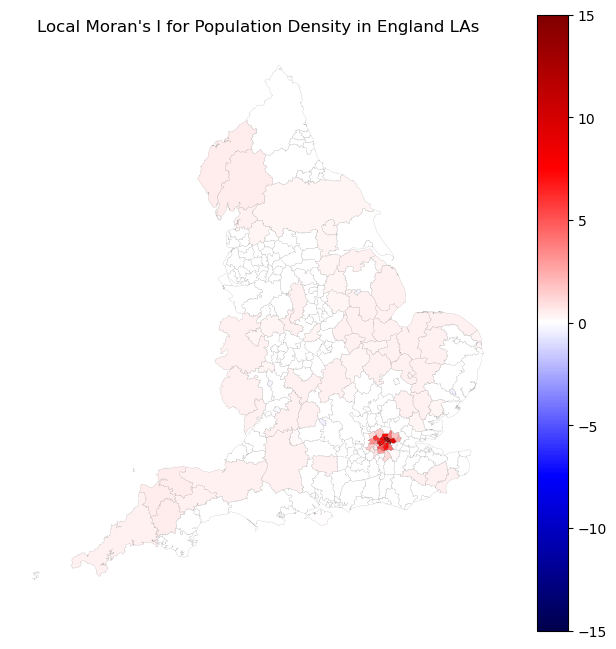
rendering: In the map, the red areas indicate high-high clusters (high population surrounded by high population), and the blue areas indicate low-low clusters (low population surrounded by low population). The white areas indicate outliers (high population surrounded by low population or low population surrounded by high population). We can found that the London boroughs are high-high clusters, and the areas in the north of England are low-low clusters.
You can find more details about the Local Moran’s I in the libpysal Local Moran I documentation.
4.3.2 Getis-Ord Gi*#
Getis-Ord Gi* is a measure of local spatial autocorrelation that identifies clusters of high or low values. It is similar to Local Moran’s I, but it is more sensitive to the presence of outliers. It is used to identify hot spots (high values) and cold spots (low values) in the data:
Where:
\(G_i^*\): Getis-Ord Gi* index/value
\( x_j \): Value at location \( j \)
\( n \): the numbers of spatial units
\( \bar{x} \): Mean of the variable
\( S\): Standard deviation of the variable
\( w_{ij} \): Spatial weight between location \( i \) and \( j \)
\( j \): Neighbors of location \( i \)
Interpretation:
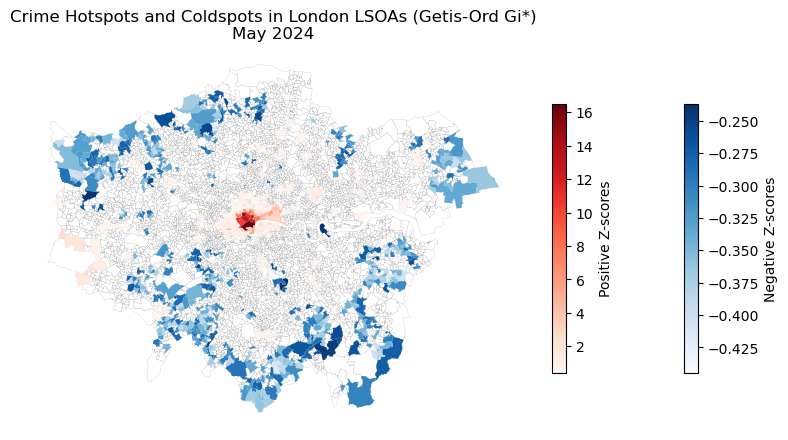
The \( G_i^* \) statistic is a z-score that indicates the presence of spatial clusters (hot or cold spots) around a location \( i \).
\( G_i^* > 0 \): Indicates clustering of high values near location –> Hot spot if p <0.05.
\( G_i^* < 0 \): Indicates clustering of low values near location \( i \) –> Cold spot if p <0.05.
\( G_i^* \approx 0 \): No significant clustering around location \( i \) –> Spatial randomness.
Note: The raw G statistic measures the spatial association of neighboring values excluding the value at the location itself.
We can use the esda library as a part of pysal to compute the Getis-Ord Gi* for detecting crime hotspots in London.
Here we use the new spatial unit of analysis from UK census, which called LSOA (Lower Layer Super Output Area) which is a small area of about 1500 people on average in the UK.
Crime data is from UK police open data, and LSOA boundary data is from ONS.
# read the lsoa boundary data of England and Wales
gdf_lsoa_uk = gpd.read_file('data/Lower_layer_Super_Output_Areas_(December_2021)_Boundaries_EW_BFC_(V10).geojson')
gdf_lsoa_uk
| FID | LSOA21CD | LSOA21NM | LSOA21NMW | BNG_E | BNG_N | LAT | LONG | Shape__Area | Shape__Length | GlobalID | geometry | |
|---|---|---|---|---|---|---|---|---|---|---|---|---|
| 0 | 1 | E01000001 | City of London 001A | 532123 | 181632 | 51.51817 | -0.097150 | 1.298653e+05 | 2635.767993 | c625aea8-6d73-4b2a-be76-4d5c44cad9f8 | POLYGON ((-0.09665 51.52028, -0.09663 51.52025... | |
| 1 | 2 | E01000002 | City of London 001B | 532480 | 181715 | 51.51883 | -0.091970 | 2.284198e+05 | 2707.816821 | 52c878e9-ac68-4886-b4a8-fea9cd241a70 | POLYGON ((-0.08967 51.52069, -0.08971 51.52058... | |
| 2 | 3 | E01000003 | City of London 001C | 532239 | 182033 | 51.52174 | -0.095330 | 5.905420e+04 | 1224.573160 | b9d8faca-d489-478d-8ce6-acaf76186d7d | POLYGON ((-0.0965 51.52295, -0.09644 51.52282,... | |
| 3 | 4 | E01000005 | City of London 001E | 533581 | 181283 | 51.51469 | -0.076280 | 1.895777e+05 | 2275.805344 | 15e1417d-537c-4845-9820-fc7596bd59b0 | POLYGON ((-0.07568 51.51575, -0.07539 51.51555... | |
| 4 | 5 | E01000006 | Barking and Dagenham 016A | 544994 | 184274 | 51.53875 | 0.089317 | 1.465370e+05 | 1966.092607 | 8a6c4ee0-c0ff-4736-9cfa-fb12a6d50da0 | POLYGON ((0.09125 51.53905, 0.0915 51.5389, 0.... | |
| ... | ... | ... | ... | ... | ... | ... | ... | ... | ... | ... | ... | ... |
| 35667 | 35668 | W01002036 | Vale of Glamorgan 005G | Bro Morgannwg 005G | 317939 | 172435 | 51.44494 | -3.182180 | 3.886975e+05 | 3584.168435 | 5e3f978b-66c7-4828-a107-321cb22354e0 | POLYGON ((-3.18412 51.44728, -3.18383 51.44727... |
| 35668 | 35669 | W01002037 | Vale of Glamorgan 005H | Bro Morgannwg 005H | 318527 | 172406 | 51.44476 | -3.173710 | 2.843506e+05 | 3225.349982 | b7aae689-c82d-4ddb-b899-4ba7918dac32 | POLYGON ((-3.16647 51.44662, -3.16682 51.44628... |
| 35669 | 35670 | W01002038 | Vale of Glamorgan 014G | Bro Morgannwg 014G | 306491 | 167360 | 51.39754 | -3.345520 | 3.495213e+06 | 12630.457940 | 144e5aed-4099-4dff-a48e-9f8c270d916b | POLYGON ((-3.34759 51.4098, -3.34771 51.40942,... |
| 35670 | 35671 | W01002039 | Vale of Glamorgan 014H | Bro Morgannwg 014H | 306564 | 166023 | 51.38553 | -3.344120 | 6.505253e+05 | 3712.034400 | bcf06740-abe0-4052-9ec2-7cad09d42195 | POLYGON ((-3.34039 51.38935, -3.34035 51.38921... |
| 35671 | 35672 | W01002040 | Vale of Glamorgan 015F | Bro Morgannwg 015F | 311423 | 167179 | 51.39670 | -3.274600 | 6.811834e+05 | 4888.403666 | 672a2fee-23b5-4a26-9a9d-901fc12f649e | POLYGON ((-3.26521 51.40005, -3.2652 51.40005,... |
35672 rows × 12 columns
There are lots of methods to select the LSAOs for LAs.
We can use the LA names to select the LSOAs ([‘LSOA21NM’]) from gdf_lsoa_uk;
We can use the LSOA codes to select the LSOAs ([‘LSOA21CD’]) from gdf_lsoa_uk, but you need to check the LSOA codes in the LAs through the look_up file.
We can use implement the sjoin between the LA geo boundary and LSOA boundary to select the LSOAs for LAs.
Here, We use the London LA names to select the LSOAs from gdf_lsoa_uk.
gdf_uk_london = gdf_uk_la[gdf_uk_la['LAD24CD'].str.startswith('E09')]
London_LA_names = gdf_uk_london.LAD24NM.unique()
print(London_LA_names)
['City of London' 'Barking and Dagenham' 'Barnet' 'Bexley' 'Brent'
 'Bromley' 'Camden' 'Croydon' 'Ealing' 'Enfield' 'Greenwich' 'Hackney'
 'Hammersmith and Fulham' 'Haringey' 'Harrow' 'Havering' 'Hillingdon'
 'Hounslow' 'Islington' 'Kensington and Chelsea' 'Kingston upon Thames'
 'Lambeth' 'Lewisham' 'Merton' 'Newham' 'Redbridge' 'Richmond upon Thames'
 'Southwark' 'Sutton' 'Tower Hamlets' 'Waltham Forest' 'Wandsworth'
 'Westminster']
'City of London 001E'
'City of London 001E'
# Extract the LA name from LSOA name (' '.join(x.split(' ')[:-1] as LSOA named as 'LA NAME 001A' ) and check if it's in London_LA_names
gdf_lsoa_uk['LA'] = gdf_lsoa_uk['LSOA21NM'].apply(lambda x: 'GL' if ' '.join(x.split(' ')[:-1]) in London_LA_names else 'NO')
# select the LSOAs in London
gdf_lsoa_london = gdf_lsoa_uk[gdf_lsoa_uk['LA'] == 'GL']
# transform the CRS to EPSG:27700 (British National Grid)
gdf_lsoa_london = gdf_lsoa_london.to_crs(epsg=27700)
# 4994 LSOAs in London
gdf_lsoa_london
| FID | LSOA21CD | LSOA21NM | LSOA21NMW | BNG_E | BNG_N | LAT | LONG | Shape__Area | Shape__Length | GlobalID | geometry | LA | |
|---|---|---|---|---|---|---|---|---|---|---|---|---|---|
| 0 | 1 | E01000001 | City of London 001A | 532123 | 181632 | 51.51817 | -0.097150 | 1.298653e+05 | 2635.767993 | c625aea8-6d73-4b2a-be76-4d5c44cad9f8 | POLYGON ((532151.55 181867.437, 532152.512 181... | GL | |
| 1 | 2 | E01000002 | City of London 001B | 532480 | 181715 | 51.51883 | -0.091970 | 2.284198e+05 | 2707.816821 | 52c878e9-ac68-4886-b4a8-fea9cd241a70 | POLYGON ((532634.509 181926.019, 532632.06 181... | GL | |
| 2 | 3 | E01000003 | City of London 001C | 532239 | 182033 | 51.52174 | -0.095330 | 5.905420e+04 | 1224.573160 | b9d8faca-d489-478d-8ce6-acaf76186d7d | POLYGON ((532153.715 182165.158, 532158.262 18... | GL | |
| 3 | 4 | E01000005 | City of London 001E | 533581 | 181283 | 51.51469 | -0.076280 | 1.895777e+05 | 2275.805344 | 15e1417d-537c-4845-9820-fc7596bd59b0 | POLYGON ((533619.075 181402.367, 533639.881 18... | GL | |
| 4 | 5 | E01000006 | Barking and Dagenham 016A | 544994 | 184274 | 51.53875 | 0.089317 | 1.465370e+05 | 1966.092607 | 8a6c4ee0-c0ff-4736-9cfa-fb12a6d50da0 | POLYGON ((545126.865 184310.841, 545145.226 18... | GL | |
| ... | ... | ... | ... | ... | ... | ... | ... | ... | ... | ... | ... | ... | ... |
| 33711 | 33712 | E01035718 | Westminster 019G | 527211 | 180107 | 51.50559 | -0.168450 | 2.671900e+06 | 10740.132994 | 738fac0f-b4ee-47dc-a87c-2c0f8f147977 | POLYGON ((528044.961 180617.988, 528046.356 18... | GL | |
| 33712 | 33713 | E01035719 | Westminster 021F | 530127 | 178755 | 51.49277 | -0.126960 | 9.294961e+04 | 2013.141792 | 7abdbf89-97f8-43f3-96b1-d162e667bed2 | POLYGON ((530267.012 178811.303, 530265.762 17... | GL | |
| 33713 | 33714 | E01035720 | Westminster 021G | 530009 | 178440 | 51.48997 | -0.128770 | 1.061637e+05 | 2229.186337 | 653fb71a-b240-4e54-875d-0ec1f2f9cc2a | POLYGON ((529856.163 178761.75, 529856.871 178... | GL | |
| 33714 | 33715 | E01035721 | Westminster 023H | 528403 | 178364 | 51.48965 | -0.151920 | 2.168432e+05 | 2738.810595 | ed04243a-989b-4bde-aeae-82d40ddffd10 | POLYGON ((528641.829 178630.889, 528635.702 17... | GL | |
| 33715 | 33716 | E01035722 | Westminster 024G | 529546 | 178076 | 51.48681 | -0.135570 | 1.222497e+05 | 2211.190430 | fd9bcb9b-a2e1-4381-a473-72bc1b5cf0c9 | POLYGON ((529606.375 178302.448, 529606.654 17... | GL |
4994 rows × 13 columns
# read the csvs in the data/police_met_city_2024 folder
import os
import glob
import pandas as pd

# get the csv files in the 2024-01 to 2014-12 folders in the data/police_met_city_2024 folder
path = 'data/police_met_city_2024'
# to get all the csv files in the path, "**/*.csv" means all the csv files in the subfolders; glob means to get the files in the path
all_files = glob.glob(os.path.join(path, "**/*.csv"), recursive=True)
# read the csv files and concatenate them into a single dataframe
df_crime = pd.concat((pd.read_csv(f) for f in all_files), ignore_index=True)
# we can save it to one csv file
# df_crime.to_csv('data/crime_2024_call_police_met_city.csv', index=False)
# check the columns
df_crime.head()
print(len(df_crime))
1149321
Now, we need conbime to df_crime (points) to gdf_lsoa_london (polygons), we can use sjoin to do this (or use the LSOA codes to do this).
# get gdf from the df_crime with x and y coordinates
gdf_crime = gpd.GeoDataFrame(df_crime, geometry=gpd.points_from_xy(df_crime['Longitude'], df_crime['Latitude']), crs='EPSG:4326')
# transform the CRS to EPSG:27700 (British National Grid)
gdf_crime = gdf_crime.to_crs(epsg=27700)
# spatial join the gdf_crime and gdf_lsoa_london
gdf_crime = gpd.sjoin(gdf_crime, gdf_lsoa_london, how='inner', predicate='intersects')
We can find there are 1,149,321 - 1,144,178 = 4,143 dropped as the pts are not intersected with the polygons.
# check the number of rows
len(gdf_crime)
# check the columns
gdf_crime.head()
| Crime ID | Month | Reported by | Falls within | Longitude | Latitude | Location | LSOA code | LSOA name | Crime type | ... | LSOA21NM | LSOA21NMW | BNG_E | BNG_N | LAT | LONG | Shape__Area | Shape__Length | GlobalID | LA | |
|---|---|---|---|---|---|---|---|---|---|---|---|---|---|---|---|---|---|---|---|---|---|
| 0 | b74d06161e2425ef2abf28345aa962fa862753669659d3... | 2024-09 | City of London Police | City of London Police | -0.107682 | 51.517786 | On or near B521 | E01000917 | Camden 027C | Robbery | ... | Camden 027C | 531169 | 181859 | 51.52043 | -0.11080 | 75063.537949 | 2405.390222 | 7205eeed-3cf1-4502-9073-4e8afb75ea58 | GL | |
| 1 | ab9f963604d03486ffbefec80f9f9296c7f65ecd4cd047... | 2024-09 | City of London Police | City of London Police | -0.107682 | 51.517786 | On or near B521 | E01000917 | Camden 027C | Violence and sexual offences | ... | Camden 027C | 531169 | 181859 | 51.52043 | -0.11080 | 75063.537949 | 2405.390222 | 7205eeed-3cf1-4502-9073-4e8afb75ea58 | GL | |
| 2 | 7eaad3255f757cf5073dfd3712193f4497e788b3f6519f... | 2024-09 | City of London Police | City of London Police | -0.112096 | 51.515942 | On or near Nightclub | E01000914 | Camden 028B | Violence and sexual offences | ... | Camden 028B | 530733 | 181688 | 51.51899 | -0.11715 | 448043.096497 | 4946.142062 | 9e7739b0-5ee1-4923-ad52-648147b8c13c | GL | |
| 3 | 71c1e6edfb73383e82ca6acdc1c9c0ef015334b529f298... | 2024-09 | City of London Police | City of London Police | -0.111596 | 51.518281 | On or near Chancery Lane | E01000914 | Camden 028B | Violence and sexual offences | ... | Camden 028B | 530733 | 181688 | 51.51899 | -0.11715 | 448043.096497 | 4946.142062 | 9e7739b0-5ee1-4923-ad52-648147b8c13c | GL | |
| 4 | 06e7c6b6541166a8abe71de2593b9576c5e26215e349e4... | 2024-09 | City of London Police | City of London Police | -0.098519 | 51.517332 | On or near Little Britain | E01000001 | City of London 001A | Other theft | ... | City of London 001A | 532123 | 181632 | 51.51817 | -0.09715 | 129865.314476 | 2635.767993 | c625aea8-6d73-4b2a-be76-4d5c44cad9f8 | GL |
5 rows × 26 columns
Spatial and temporal aggregation of the data refers to the process of combining and summarizing data across different geographic areas (spatial) and time periods (temporal):
Spatial Aggregation:
Combining data from smaller geographic units into larger areas
Example: Aggregating crime incidents from LSOA level to London borough level
Temporal Aggregation:
Combining data across different time periods
Example: Converting daily crime data into monthly or yearly totals
# here we aggregate the all crime data to LSOA and month level using groupby
df_crime_agg = gdf_crime.groupby(['LSOA21CD', 'Month']).agg({'Crime ID': 'count'}).reset_index().rename(columns={'Crime ID': 'Count'})
# select May 2024 of all crimes for analysis
df_crime_agg_may = df_crime_agg[df_crime_agg['Month'] == '2024-05']
# check the columns
df_crime_agg_may
| LSOA21CD | Month | Count | |
|---|---|---|---|
| 4 | E01000001 | 2024-05 | 11 |
| 16 | E01000002 | 2024-05 | 38 |
| 28 | E01000003 | 2024-05 | 13 |
| 40 | E01000005 | 2024-05 | 72 |
| 52 | E01000006 | 2024-05 | 10 |
| ... | ... | ... | ... |
| 59503 | E01035718 | 2024-05 | 156 |
| 59515 | E01035719 | 2024-05 | 9 |
| 59527 | E01035720 | 2024-05 | 3 |
| 59539 | E01035721 | 2024-05 | 61 |
| 59551 | E01035722 | 2024-05 | 7 |
4965 rows × 3 columns
print('The numbers of LSOAs without crime in May 2024:', len(gdf_lsoa_london) - len(df_crime_agg_may))
The numbers of LSOAs without crime in May 2024: 29
# We use esda to compute the Getis-Ord Gi* for detecting crime hotspots in London.
# first, we need to merge the gdf_crime_agg_may with gdf_lsoa_london to get the geometry
gdf_crime_agg_may = pd.merge(gdf_lsoa_london[['LSOA21CD', 'geometry']], df_crime_agg_may, on='LSOA21CD', how='left')
# fill na
gdf_crime_agg_may = gdf_crime_agg_may.fillna(0)
gdf_crime_agg_may
| LSOA21CD | geometry | Month | Count | |
|---|---|---|---|---|
| 0 | E01000001 | POLYGON ((532151.55 181867.437, 532152.512 181... | 2024-05 | 11.0 |
| 1 | E01000002 | POLYGON ((532634.509 181926.019, 532632.06 181... | 2024-05 | 38.0 |
| 2 | E01000003 | POLYGON ((532153.715 182165.158, 532158.262 18... | 2024-05 | 13.0 |
| 3 | E01000005 | POLYGON ((533619.075 181402.367, 533639.881 18... | 2024-05 | 72.0 |
| 4 | E01000006 | POLYGON ((545126.865 184310.841, 545145.226 18... | 2024-05 | 10.0 |
| ... | ... | ... | ... | ... |
| 4989 | E01035718 | POLYGON ((528044.961 180617.988, 528046.356 18... | 2024-05 | 156.0 |
| 4990 | E01035719 | POLYGON ((530267.012 178811.303, 530265.762 17... | 2024-05 | 9.0 |
| 4991 | E01035720 | POLYGON ((529856.163 178761.75, 529856.871 178... | 2024-05 | 3.0 |
| 4992 | E01035721 | POLYGON ((528641.829 178630.889, 528635.702 17... | 2024-05 | 61.0 |
| 4993 | E01035722 | POLYGON ((529606.375 178302.448, 529606.654 17... | 2024-05 | 7.0 |
4994 rows × 4 columns
# compute the spatial weights using the Queen contiguity method
w_lsoa_london = weights.Queen.from_dataframe(gdf_crime_agg_may, use_index='True')
# compute the Getis-Ord Gi* for the crime data
gi = esda.G_Local(gdf_crime_agg_may['Count'].values, w_lsoa_london)
# print the Getis-Ord Gi* values
gi.Zs
array([ 4.8966406 ,  6.05568957,  1.26792881, ..., -0.20360301,
        0.42941597, -0.17028329])
len(gi.Zs)
4994
# plot the distribution of Getis-Ord Gi* using histogram and kde by seaborn
fig, ax = plt.subplots(figsize=(4, 4))
sns.histplot(gi.Zs, kde=True, ax=ax)
ax.set_xlabel('Getis-Ord Gi*')
ax.set_ylabel('Density')
Text(0, 0.5, 'Density')
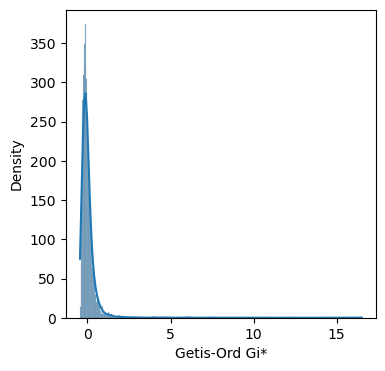
Z-scores: standardized G statistics that follow a normal distribution under spatial randomness.
P values: P-values from randomization/permutation.
# we can generate a df to show all the atrributes of the Getis-Ord Gi*
df_gi = pd.DataFrame({
    'Zs': gi.Zs,  # Z-scores: standardized G statistics that follow a normal distribution under spatial randomness
    'Gs': gi.Gs,  # Raw G statistics: measure of spatial concentration of attribute values (crime counts)
    'p_sim': gi.p_sim  # P-values from randomization
})
df_gi
| Zs | Gs | p_sim | |
|---|---|---|---|
| 0 | 4.896641 | 0.002149 | 0.001 |
| 1 | 6.055690 | 0.002611 | 0.001 |
| 2 | 1.267929 | 0.000705 | 0.012 |
| 3 | 3.965206 | 0.001779 | 0.001 |
| 4 | -0.012130 | 0.000195 | 0.355 |
| ... | ... | ... | ... |
| 4989 | 1.016448 | 0.000605 | 0.006 |
| 4990 | 0.637040 | 0.000454 | 0.030 |
| 4991 | -0.203603 | 0.000119 | 0.232 |
| 4992 | 0.429416 | 0.000371 | 0.050 |
| 4993 | -0.170283 | 0.000133 | 0.308 |
4994 rows × 3 columns
You can use any strategies to plot the gi resluts, here we can plot the results to the map with three parts:
Hotspots: High positive Z-score (>0) with p-value < 0.05.
Coldspots: High negative Z-score (<0) with p-value < 0.05.
We usually use blank color to draw the ‘Not Significant cluster’ (p_value \(\geq\) 0.05).
# Add the Z-scores to the GeoDataFrame
gdf_crime_agg_may['Z_score'] = gi.Zs
gdf_crime_agg_may['p_sim'] = gi.p_sim
# Create a figure and axis
fig, ax = plt.subplots(figsize=(10, 10))
# Plot not significant areas (p_sim >= 0.05)
gdf_crime_agg_may[gdf_crime_agg_may['p_sim'] >= 0.05].plot(
    ax=ax, color='white', edgecolor='black', linewidth=0.05)
# Plot cold spots (negative Z-scores and p_sim < 0.05)
gdf_crime_agg_may[(gdf_crime_agg_may['Z_score'] < 0) & (gdf_crime_agg_may['p_sim'] < 0.05)].plot(
    column='Z_score',
    ax=ax,
    cmap='Blues',
    legend=True,
    legend_kwds={'shrink': 0.35, 'orientation': 'vertical', 'label': 'Negative Z-scores',},
    linewidth=0.05)
# Plot hot spots (positive Z-scores and p_sim < 0.05)
gdf_crime_agg_may[(gdf_crime_agg_may['Z_score'] > 0) & (gdf_crime_agg_may['p_sim'] < 0.05)].plot(
    column='Z_score',
    ax=ax,
    cmap='Reds',
    legend=True,
    legend_kwds={'shrink': 0.35, 'orientation': 'vertical', 'label': 'Positive Z-scores'},
    linewidth=0.05)
ax.axis('off')
plt.title('Crime Hotspots and Coldspots in London LSOAs (Getis-Ord Gi*)\nMay 2024')
plt.show()
4.4 Kernel density estimation (KDE) analysis#
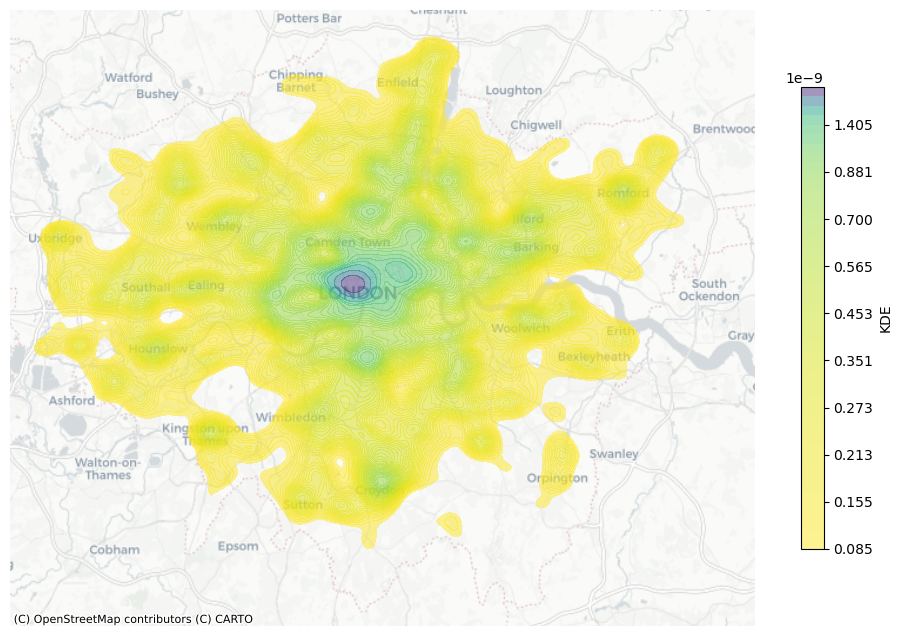
Kernel Density Analysis (KDE) is a spatial analysis technique used to estimate the density of features (usually points or lines) across a surface. It creates a smooth, continuous surface that highlights areas of high and low concentration, often referred to as hotspots.
KDE function:
\( \hat{f}(x) \) is the estimated density at location \( x \), how “intense” the points are around location \(x\) (i.e., the ‘grid cell’ center or pixel).
\( n \) is the total number of observations.
\( h \) is the bandwidth (smoothing parameter). It controls the “spread” of the kernel. Larger \(h\) = smoother surface; smaller \(h\) = more detailed, but possibly noisy.
\( h^2\): Since we are in 2D space, the area scaling is by \( h^2 \). In 1D, it’s just \(h\).
\( x \): Target location where we estimate the density (i.e., the ‘grid cell’ center or pixel).
\( x_i \): observed data point location.
\( \|x - x_i\| \): Euclidean distance between location \(x\) and \(x_i\).
\( K \) is the kernel function (e.g., Gaussian), which defines the shape of the influence of each point.
Gaussian KDE:
\(u\): \(u = \|x - x_i\|\);
\(e\): Euler’s number (~2.718), base of the natural exponential;
\(e^{-\frac{1}{2} u^2}\): Gives the Gaussian bell curve shape;
\(\frac{1}{2\pi}\): Normalization constant for 2D Gaussian;
gdf_crime.Month.unique()
array(['2024-09', '2024-07', '2024-06', '2024-01', '2024-08', '2024-12',
       '2024-04', '2024-03', '2024-02', '2024-05', '2024-11', '2024-10'],
      dtype=object)
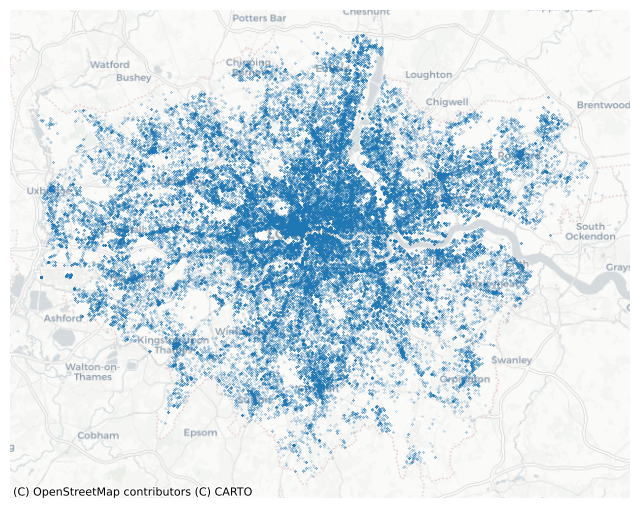
gdf_crime_london_may = gdf_crime[gdf_crime['Month'] == '2024-05']
# transfer to web mercator
gdf_crime_london_may = gdf_crime_london_may.to_crs(epsg=3857)
gdf_crime_london_may
| Crime ID | Month | Reported by | Falls within | Longitude | Latitude | Location | LSOA code | LSOA name | Crime type | ... | LSOA21NM | LSOA21NMW | BNG_E | BNG_N | LAT | LONG | Shape__Area | Shape__Length | GlobalID | LA | |
|---|---|---|---|---|---|---|---|---|---|---|---|---|---|---|---|---|---|---|---|---|---|
| 850782 | eebfcc999f8ab6654adc6bc681e9ea2cd91c5026f895eb... | 2024-05 | City of London Police | City of London Police | -0.106345 | 51.520463 | On or near Further/Higher Educational Building | E01000916 | Camden 027B | Theft from the person | ... | Camden 027B | 531300 | 181907 | 51.52083 | -0.10890 | 147250.335907 | 2272.325316 | 63388f71-c821-452f-bb92-dc8f74f031f3 | GL | |
| 850783 | 67cbe410e90ad30207c925457c4d223e890f49dc7b394e... | 2024-05 | City of London Police | City of London Police | -0.106220 | 51.518275 | On or near B500 | E01000916 | Camden 027B | Theft from the person | ... | Camden 027B | 531300 | 181907 | 51.52083 | -0.10890 | 147250.335907 | 2272.325316 | 63388f71-c821-452f-bb92-dc8f74f031f3 | GL | |
| 850784 | a86f33f326d3d9a1f8c3972520e11717766029031efb90... | 2024-05 | City of London Police | City of London Police | -0.107682 | 51.517786 | On or near B521 | E01000917 | Camden 027C | Drugs | ... | Camden 027C | 531169 | 181859 | 51.52043 | -0.11080 | 75063.537949 | 2405.390222 | 7205eeed-3cf1-4502-9073-4e8afb75ea58 | GL | |
| 850785 | 7a0554ddf2546c70556b59f8f7ca33099c3bd88fea79c7... | 2024-05 | City of London Police | City of London Police | -0.107682 | 51.517786 | On or near B521 | E01000917 | Camden 027C | Other theft | ... | Camden 027C | 531169 | 181859 | 51.52043 | -0.11080 | 75063.537949 | 2405.390222 | 7205eeed-3cf1-4502-9073-4e8afb75ea58 | GL | |
| 850786 | NaN | 2024-05 | City of London Police | City of London Police | -0.111596 | 51.518281 | On or near Chancery Lane | E01000914 | Camden 028B | Anti-social behaviour | ... | Camden 028B | 530733 | 181688 | 51.51899 | -0.11715 | 448043.096497 | 4946.142062 | 9e7739b0-5ee1-4923-ad52-648147b8c13c | GL | |
| ... | ... | ... | ... | ... | ... | ... | ... | ... | ... | ... | ... | ... | ... | ... | ... | ... | ... | ... | ... | ... | ... |
| 948781 | 26f6034c0c51ca869a66a660a4cd3d9c548c6a48f5f7c6... | 2024-05 | Metropolitan Police Service | Metropolitan Police Service | -0.135320 | 51.487600 | On or near St George'S Square | E01035722 | Westminster 024G | Other theft | ... | Westminster 024G | 529546 | 178076 | 51.48681 | -0.13557 | 122249.696388 | 2211.190430 | fd9bcb9b-a2e1-4381-a473-72bc1b5cf0c9 | GL | |
| 948782 | ac16503056d8b26a3c0b4f407b7a632d8a4a2bee435838... | 2024-05 | Metropolitan Police Service | Metropolitan Police Service | -0.136284 | 51.485152 | On or near Petrol Station | E01035722 | Westminster 024G | Other theft | ... | Westminster 024G | 529546 | 178076 | 51.48681 | -0.13557 | 122249.696388 | 2211.190430 | fd9bcb9b-a2e1-4381-a473-72bc1b5cf0c9 | GL | |
| 948783 | 88bf1a5d62b5201749e67773eb1108c13971d6f8067b86... | 2024-05 | Metropolitan Police Service | Metropolitan Police Service | -0.135320 | 51.487600 | On or near St George'S Square | E01035722 | Westminster 024G | Robbery | ... | Westminster 024G | 529546 | 178076 | 51.48681 | -0.13557 | 122249.696388 | 2211.190430 | fd9bcb9b-a2e1-4381-a473-72bc1b5cf0c9 | GL | |
| 948784 | 3598323197468c36768d7a72a8015c721ec1a65fbd1bdf... | 2024-05 | Metropolitan Police Service | Metropolitan Police Service | -0.136284 | 51.485152 | On or near Petrol Station | E01035722 | Westminster 024G | Theft from the person | ... | Westminster 024G | 529546 | 178076 | 51.48681 | -0.13557 | 122249.696388 | 2211.190430 | fd9bcb9b-a2e1-4381-a473-72bc1b5cf0c9 | GL | |
| 948785 | 19f7be6ed6c32479c4d138650ba5d19ee5c76144a390f1... | 2024-05 | Metropolitan Police Service | Metropolitan Police Service | -0.137230 | 51.486309 | On or near Parking Area | E01035722 | Westminster 024G | Violence and sexual offences | ... | Westminster 024G | 529546 | 178076 | 51.48681 | -0.13557 | 122249.696388 | 2211.190430 | fd9bcb9b-a2e1-4381-a473-72bc1b5cf0c9 | GL |
97636 rows × 26 columns
fig, ax = plt.subplots(figsize=(8, 8))
gdf_crime_london_may.plot(ax=ax, markersize=0.03)
cx.add_basemap(ax, crs="EPSG:3857", source=cx.providers.CartoDB.Positron, zoom=10)
ax.axis('off')
plt.show()
We use seaborn.kdeplot to plot the KDE analysis. in kedplot, it inherently use the gaussian_kde() in SciPy to caculate KDE, then it evaluates the KDE on the grid created.
fig, ax = plt.subplots(figsize=(12, 8))
kde = sns.kdeplot(ax=ax, x=gdf_crime_london_may.geometry.x,
            y=gdf_crime_london_may.geometry.y,
            n_levels=50, # how many contour lines or shaded bands are drawn in a 2D KDE plot
            shade=True,
            alpha=0.5,
            cmap="viridis_r",
            bw_adjust=0.6, # Adjust the bandwidth (lower values = narrower kernel)
            gridsize=300, # Number of points on each dimension of the evaluation grid.
             )
# Add colorbar manually
cbar = plt.colorbar(kde.collections[0], ax=ax, shrink=0.75)
cbar.set_label("KDE")
cx.add_basemap(ax, crs="EPSG:3857", source=cx.providers.CartoDB.Positron, zoom=10)
ax.axis('off')
plt.show()
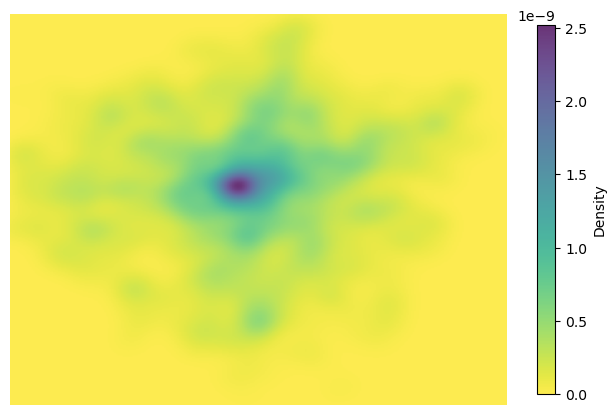
np.mgrid is a mesh-grid generator in NumPy. It creates coordinate matrices (grids) from coordinate vectors, typically used for evaluating functions over a 2D area.
from scipy.stats import gaussian_kde
import numpy as np
# Extract coordinates
x = gdf_crime_london_may.geometry.x
y = gdf_crime_london_may.geometry.y
point_xy = np.vstack([x, y]) # vertical stack in NumPy, It takes a sequence of arrays and stacks them vertically (row-wise) to make a new 2D array.

# Compute KDE
ke = gaussian_kde(point_xy)
# Create a grid over the area
xmin, xmax = x.min(), x.max()
ymin, ymax = y.min(), y.max()
#xmin:xmax:300j means: create 300 points evenly spaced from xmin to xmax.
#ymin:ymax:300j means: create 300 points evenly spaced from ymin to ymax.
#The j here is not the imaginary unit, but a special notation in NumPy that means number of points rather than step size.
xx, yy = np.mgrid[xmin:xmax:300j, ymin:ymax:300j]
# .ravel() is a NumPy method that flattens the array into a 1D array by stacking all the rows
grid_coords = np.vstack([xx.ravel(), yy.ravel()])
# Evaluate KDE on created grid
zz = ke(grid_coords).reshape(xx.shape)

# Plot
fig, ax = plt.subplots(figsize=(8, 8))
# zz.T transpose of the array
im = ax.imshow(zz.T, extent=[xmin, xmax, ymin, ymax], origin='lower', cmap='viridis_r', alpha=0.8)
plt.colorbar(im, label='Density', shrink=0.6)
ax.set_axis_off()
plt.show()
Additional source:
KDE can be calculated by SKlearn.
Folium also provides Heatmap Plugins to create the interactive heat maps.
Quiz#
Q1: Identify all Lower Layer Super Output Areas (LSOAs) within “Kingston upon Hull”. Output relevant information including a map visualization and the total number of LSOAs in Hull. Then, compute the spatial weights matrix (Queen method) for these LSOAs. (UK LSOAs data can be found in
data/Lower_layer_Super_Output_Areas_(December_2021)_Boundaries_EW_BFC_(V10).geojson)Q2: Obtain crime data from the 2024 Humberside Police open dataset folder (
data/police_humberside_2024). Use the2024-07all crime data type for analysis. Perform a spatial join to associate all crime incidents with corresponding LSOA. Aggregating the crime counts to the LSOA level using the total amount of crime as the measurement variable.Q3: Calculate and output Global Moran’s I (LSOA level, not the point-level).
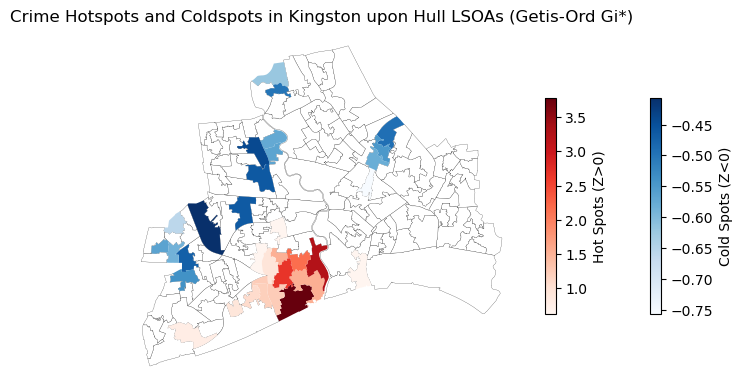
Q4: Creating hostpot maps using Local Moran’s I and Getis-Ord Gi* statistics.
Q1 solution
gdf_lsoa_uk = gpd.read_file('data/Lower_layer_Super_Output_Areas_(December_2021)_Boundaries_EW_BFC_(V10).geojson')
gdf_lsoa_uk.head()
| FID | LSOA21CD | LSOA21NM | LSOA21NMW | BNG_E | BNG_N | LAT | LONG | Shape__Area | Shape__Length | GlobalID | geometry | |
|---|---|---|---|---|---|---|---|---|---|---|---|---|
| 0 | 1 | E01000001 | City of London 001A | 532123 | 181632 | 51.51817 | -0.097150 | 129865.314476 | 2635.767993 | c625aea8-6d73-4b2a-be76-4d5c44cad9f8 | POLYGON ((-0.09665 51.52028, -0.09663 51.52025... | |
| 1 | 2 | E01000002 | City of London 001B | 532480 | 181715 | 51.51883 | -0.091970 | 228419.782242 | 2707.816821 | 52c878e9-ac68-4886-b4a8-fea9cd241a70 | POLYGON ((-0.08967 51.52069, -0.08971 51.52058... | |
| 2 | 3 | E01000003 | City of London 001C | 532239 | 182033 | 51.52174 | -0.095330 | 59054.204697 | 1224.573160 | b9d8faca-d489-478d-8ce6-acaf76186d7d | POLYGON ((-0.0965 51.52295, -0.09644 51.52282,... | |
| 3 | 4 | E01000005 | City of London 001E | 533581 | 181283 | 51.51469 | -0.076280 | 189577.709503 | 2275.805344 | 15e1417d-537c-4845-9820-fc7596bd59b0 | POLYGON ((-0.07568 51.51575, -0.07539 51.51555... | |
| 4 | 5 | E01000006 | Barking and Dagenham 016A | 544994 | 184274 | 51.53875 | 0.089317 | 146536.995750 | 1966.092607 | 8a6c4ee0-c0ff-4736-9cfa-fb12a6d50da0 | POLYGON ((0.09125 51.53905, 0.0915 51.5389, 0.... |
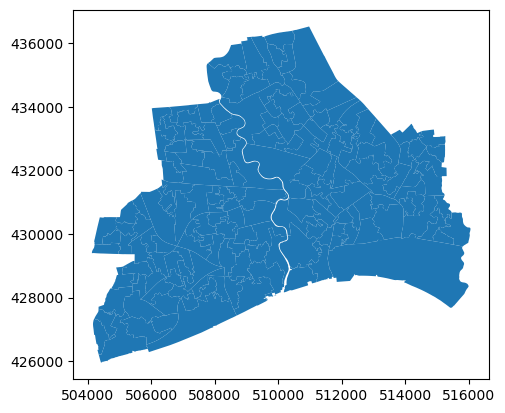
# select the LSOAs in Kingston upon Hull
gdf_lsoa_hull = gdf_lsoa_uk[gdf_lsoa_uk['LSOA21NM'].str.contains('Kingston upon Hull')]
# transfer the crs
gdf_lsoa_hull = gdf_lsoa_hull.to_crs(epsg=27700)
print(len(gdf_lsoa_hull))
gdf_lsoa_hull.plot()
168
<Axes: >
gdf_lsoa_hull.head()
| FID | LSOA21CD | LSOA21NM | LSOA21NMW | BNG_E | BNG_N | LAT | LONG | Shape__Area | Shape__Length | GlobalID | geometry | |
|---|---|---|---|---|---|---|---|---|---|---|---|---|
| 12115 | 12116 | E01012756 | Kingston upon Hull 025A | 507367 | 430316 | 53.75817 | -0.37294 | 198939.277603 | 3497.174098 | b1f95abf-436c-4f5a-b6e1-93be9e0eb24d | POLYGON ((507433.012 430447.008, 507438.614 43... | |
| 12116 | 12117 | E01012757 | Kingston upon Hull 025B | 508017 | 429519 | 53.75088 | -0.36336 | 318088.364120 | 3716.172876 | 5f00b0d5-45c1-4529-9e08-881c4c58834d | POLYGON ((508039.325 430021.467, 508047.639 42... | |
| 12117 | 12118 | E01012758 | Kingston upon Hull 018A | 507706 | 430320 | 53.75814 | -0.36780 | 311920.300018 | 3772.447527 | 94cd85a6-b982-4038-9625-333de4b818df | POLYGON ((507791.196 430453.312, 507795.719 43... | |
| 12118 | 12119 | E01012759 | Kingston upon Hull 025C | 507184 | 429662 | 53.75233 | -0.37594 | 398184.936035 | 3984.903843 | 1516f69d-ec4e-4e2b-8f3d-81d5f680f631 | POLYGON ((507088.105 429992.978, 507088.215 42... | |
| 12119 | 12120 | E01012760 | Kingston upon Hull 025D | 507714 | 429795 | 53.75342 | -0.36786 | 126002.444229 | 2081.849577 | 2e8144b1-63d2-4100-b2a5-a1fe09759513 | POLYGON ((507913.848 429950.94, 507917.695 429... |
# reindex
gdf_lsoa_hull.index = range(len(gdf_lsoa_hull))
# calculate the spatial weights using the Queen contiguity method
w_lsoa_hull = weights.Queen.from_dataframe(gdf_lsoa_hull, use_index='True')
# print the spatial weights as df
df_w_lsoa_hull = w_lsoa_hull.to_adjlist(drop_islands=True)
df_w_lsoa_hull
| focal | neighbor | weight | |
|---|---|---|---|
| 0 | 0 | 2 | 1.0 |
| 1 | 0 | 3 | 1.0 |
| 2 | 0 | 4 | 1.0 |
| 3 | 0 | 35 | 1.0 |
| 4 | 0 | 37 | 1.0 |
| ... | ... | ... | ... |
| 887 | 166 | 167 | 1.0 |
| 888 | 167 | 71 | 1.0 |
| 889 | 167 | 156 | 1.0 |
| 890 | 167 | 165 | 1.0 |
| 891 | 167 | 166 | 1.0 |
892 rows × 3 columns
Q2 solution
df_crime_hu_2024 = pd.read_csv('data/police_humberside_2024/2024-07/2024-07-humberside-street.csv')
df_crime_hu_2024
| Crime ID | Month | Reported by | Falls within | Longitude | Latitude | Location | LSOA code | LSOA name | Crime type | Last outcome category | Context | |
|---|---|---|---|---|---|---|---|---|---|---|---|---|
| 0 | db0f44d9523f2ec3713b89dc85de32390d7846d4857b18... | 2024-07 | Humberside Police | Humberside Police | -2.268891 | 53.548199 | On or near Rothay Close | E01004941 | Bury 021A | Public order | Investigation complete; no suspect identified | NaN |
| 1 | 36be51a29a5b2e9603ef61c7f0915f7a877d94082f418f... | 2024-07 | Humberside Police | Humberside Police | -2.290840 | 53.520355 | On or near Venwood Road | E01005031 | Bury 025A | Public order | Court result unavailable | NaN |
| 2 | 1b0c316c8c3a4c0f75592f16d4672e24fc4c977eab7ae3... | 2024-07 | Humberside Police | Humberside Police | -1.924643 | 54.544159 | On or near Shopping Area | E01020854 | County Durham 067F | Violence and sexual offences | Unable to prosecute suspect | NaN |
| 3 | 22c74bdf8fce39c14cd76207bae4fef5719cfb4658bc6f... | 2024-07 | Humberside Police | Humberside Police | -0.183283 | 51.117402 | On or near Exchange Road | E01031585 | Crawley 004C | Violence and sexual offences | Status update unavailable | NaN |
| 4 | b6f7155c48ca46c57cd20afcc5c6bb07a1ce1d42618415... | 2024-07 | Humberside Police | Humberside Police | -0.915717 | 53.571778 | On or near Low Levels Bank | E01007559 | Doncaster 008D | Vehicle crime | Investigation complete; no suspect identified | NaN |
| ... | ... | ... | ... | ... | ... | ... | ... | ... | ... | ... | ... | ... |
| 9105 | 31b720576e28ed22c8ce7d88459354c16bd69203ecc8d5... | 2024-07 | Humberside Police | Humberside Police | -0.786901 | 53.417548 | On or near Southlands Drive | E01026408 | West Lindsey 002F | Violence and sexual offences | Unable to prosecute suspect | NaN |
| 9106 | e03bd02394c757448d696e29eef78c95aab5d37758b808... | 2024-07 | Humberside Police | Humberside Police | -0.783777 | 53.406801 | On or near Mercer Road | E01026378 | West Lindsey 004A | Violence and sexual offences | Court result unavailable | NaN |
| 9107 | 5eb623d7120422789578385c41c2122e7a668dfca83f0b... | 2024-07 | Humberside Police | Humberside Police | -0.774953 | 53.391906 | On or near Petrol Station | E01026383 | West Lindsey 004E | Violence and sexual offences | Unable to prosecute suspect | NaN |
| 9108 | 61567f9efb26eac00b89587559c1c1473824198b48957a... | 2024-07 | Humberside Police | Humberside Police | -0.600770 | 53.407881 | On or near Dawnhill Lane | E01026385 | West Lindsey 005A | Violence and sexual offences | Unable to prosecute suspect | NaN |
| 9109 | 3b6096ad0ef42e9b924002113e208a910aae54f1dcb91d... | 2024-07 | Humberside Police | Humberside Police | -0.563082 | 53.393698 | On or near Creampoke Crescent | E01026386 | West Lindsey 005B | Vehicle crime | Investigation complete; no suspect identified | NaN |
9110 rows × 12 columns
# create the gdf from the df_crime_hu_2024 with x and y coordinates
gdf_crime_hu = gpd.GeoDataFrame(df_crime_hu_2024, geometry=gpd.points_from_xy(df_crime_hu_2024['Longitude'],
                                                                              df_crime_hu_2024['Latitude']), crs='EPSG:4326')
# transform the CRS to EPSG:27700 (British National Grid)
gdf_crime_hu = gdf_crime_hu.to_crs(epsg=27700)
gdf_crime_hu
| Crime ID | Month | Reported by | Falls within | Longitude | Latitude | Location | LSOA code | LSOA name | Crime type | Last outcome category | Context | geometry | |
|---|---|---|---|---|---|---|---|---|---|---|---|---|---|
| 0 | db0f44d9523f2ec3713b89dc85de32390d7846d4857b18... | 2024-07 | Humberside Police | Humberside Police | -2.268891 | 53.548199 | On or near Rothay Close | E01004941 | Bury 021A | Public order | Investigation complete; no suspect identified | NaN | POINT (382280.834 405761.213) |
| 1 | 36be51a29a5b2e9603ef61c7f0915f7a877d94082f418f... | 2024-07 | Humberside Police | Humberside Police | -2.290840 | 53.520355 | On or near Venwood Road | E01005031 | Bury 025A | Public order | Court result unavailable | NaN | POINT (380813.893 402669.101) |
| 2 | 1b0c316c8c3a4c0f75592f16d4672e24fc4c977eab7ae3... | 2024-07 | Humberside Police | Humberside Police | -1.924643 | 54.544159 | On or near Shopping Area | E01020854 | County Durham 067F | Violence and sexual offences | Unable to prosecute suspect | NaN | POINT (404973.562 516546.025) |
| 3 | 22c74bdf8fce39c14cd76207bae4fef5719cfb4658bc6f... | 2024-07 | Humberside Police | Humberside Police | -0.183283 | 51.117402 | On or near Exchange Road | E01031585 | Crawley 004C | Violence and sexual offences | Status update unavailable | NaN | POINT (527250.11 136915.397) |
| 4 | b6f7155c48ca46c57cd20afcc5c6bb07a1ce1d42618415... | 2024-07 | Humberside Police | Humberside Police | -0.915717 | 53.571778 | On or near Low Levels Bank | E01007559 | Doncaster 008D | Vehicle crime | Investigation complete; no suspect identified | NaN | POINT (471900.336 408896.718) |
| ... | ... | ... | ... | ... | ... | ... | ... | ... | ... | ... | ... | ... | ... |
| 9105 | 31b720576e28ed22c8ce7d88459354c16bd69203ecc8d5... | 2024-07 | Humberside Police | Humberside Police | -0.786901 | 53.417548 | On or near Southlands Drive | E01026408 | West Lindsey 002F | Violence and sexual offences | Unable to prosecute suspect | NaN | POINT (480722.247 391876.638) |
| 9106 | e03bd02394c757448d696e29eef78c95aab5d37758b808... | 2024-07 | Humberside Police | Humberside Police | -0.783777 | 53.406801 | On or near Mercer Road | E01026378 | West Lindsey 004A | Violence and sexual offences | Court result unavailable | NaN | POINT (480950.184 390684.609) |
| 9107 | 5eb623d7120422789578385c41c2122e7a668dfca83f0b... | 2024-07 | Humberside Police | Humberside Police | -0.774953 | 53.391906 | On or near Petrol Station | E01026383 | West Lindsey 004E | Violence and sexual offences | Unable to prosecute suspect | NaN | POINT (481565.151 389037.635) |
| 9108 | 61567f9efb26eac00b89587559c1c1473824198b48957a... | 2024-07 | Humberside Police | Humberside Police | -0.600770 | 53.407881 | On or near Dawnhill Lane | E01026385 | West Lindsey 005A | Violence and sexual offences | Unable to prosecute suspect | NaN | POINT (493113.206 391027.523) |
| 9109 | 3b6096ad0ef42e9b924002113e208a910aae54f1dcb91d... | 2024-07 | Humberside Police | Humberside Police | -0.563082 | 53.393698 | On or near Creampoke Crescent | E01026386 | West Lindsey 005B | Vehicle crime | Investigation complete; no suspect identified | NaN | POINT (495650.172 389499.55) |
9110 rows × 13 columns
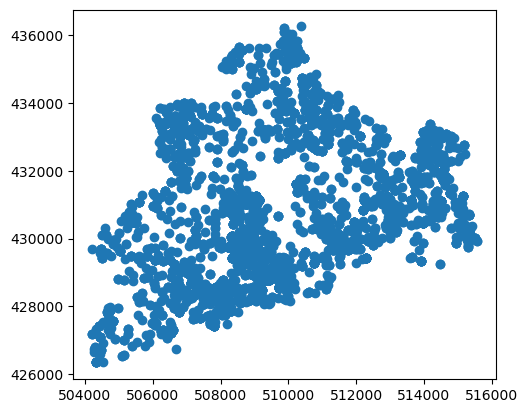
# spatial join the gdf_crime_hu and gdf_lsoa_hull to get the LSOA index for each crime incident (we don't use the 'LSOA codes' in the df_crime_hu_2024)
gdf_crime_hu_lsoa = gpd.sjoin(gdf_crime_hu, gdf_lsoa_hull, how='inner', predicate='within')
gdf_crime_hu_lsoa
| Crime ID | Month | Reported by | Falls within | Longitude | Latitude | Location | LSOA code | LSOA name | Crime type | ... | LSOA21CD | LSOA21NM | LSOA21NMW | BNG_E | BNG_N | LAT | LONG | Shape__Area | Shape__Length | GlobalID | |
|---|---|---|---|---|---|---|---|---|---|---|---|---|---|---|---|---|---|---|---|---|---|
| 2194 | NaN | 2024-07 | Humberside Police | Humberside Police | -0.319102 | 53.795305 | On or near Finningley Garth | E01012782 | Kingston upon Hull 002A | Anti-social behaviour | ... | E01012782 | Kingston upon Hull 002A | 510564 | 434676 | 53.79667 | -0.32291 | 295014.267838 | 2717.829437 | 4bac5250-9916-4da1-87ac-00c02f2d47b4 | |
| 2195 | 2914efb412b1e124dc12b379fe395d457d11b998690d24... | 2024-07 | Humberside Police | Humberside Police | -0.325162 | 53.797160 | On or near Abingdon Garth | E01012782 | Kingston upon Hull 002A | Bicycle theft | ... | E01012782 | Kingston upon Hull 002A | 510564 | 434676 | 53.79667 | -0.32291 | 295014.267838 | 2717.829437 | 4bac5250-9916-4da1-87ac-00c02f2d47b4 | |
| 2196 | f8c053aed0021740e7e17f577414c52eff339a3fe85a80... | 2024-07 | Humberside Police | Humberside Police | -0.320579 | 53.796719 | On or near Digby Garth | E01012782 | Kingston upon Hull 002A | Burglary | ... | E01012782 | Kingston upon Hull 002A | 510564 | 434676 | 53.79667 | -0.32291 | 295014.267838 | 2717.829437 | 4bac5250-9916-4da1-87ac-00c02f2d47b4 | |
| 2197 | 70598a4effd9969de667c33037522cd7d3209c03b8e308... | 2024-07 | Humberside Police | Humberside Police | -0.325162 | 53.797160 | On or near Abingdon Garth | E01012782 | Kingston upon Hull 002A | Criminal damage and arson | ... | E01012782 | Kingston upon Hull 002A | 510564 | 434676 | 53.79667 | -0.32291 | 295014.267838 | 2717.829437 | 4bac5250-9916-4da1-87ac-00c02f2d47b4 | |
| 2198 | f6632e2e3eed766b50dd277da0aa143e0fec44abbbf554... | 2024-07 | Humberside Police | Humberside Police | -0.325162 | 53.797160 | On or near Abingdon Garth | E01012782 | Kingston upon Hull 002A | Other theft | ... | E01012782 | Kingston upon Hull 002A | 510564 | 434676 | 53.79667 | -0.32291 | 295014.267838 | 2717.829437 | 4bac5250-9916-4da1-87ac-00c02f2d47b4 | |
| ... | ... | ... | ... | ... | ... | ... | ... | ... | ... | ... | ... | ... | ... | ... | ... | ... | ... | ... | ... | ... | ... |
| 5650 | a43df72a23c5e5fc6944c3769ed323317c1879693b6571... | 2024-07 | Humberside Police | Humberside Police | -0.347889 | 53.795045 | On or near Shopping Area | E01033105 | Kingston upon Hull 035D | Other crime | ... | E01033105 | Kingston upon Hull 035D | 509270 | 434654 | 53.79675 | -0.34256 | 407379.168350 | 3953.907070 | d4f9f0ce-a99e-47be-995b-5af0f302b061 | |
| 5651 | 1f5ce2f185ded208a8e75f9a6a79de96007917d15fb824... | 2024-07 | Humberside Police | Humberside Police | -0.355095 | 53.793485 | On or near Raich Carter Way | E01033107 | Kingston upon Hull 035E | Bicycle theft | ... | E01033107 | Kingston upon Hull 035E | 508618 | 434547 | 53.79592 | -0.35249 | 392191.723434 | 3331.231133 | f698240e-05d9-4a6a-8c12-ba6f537ddef1 | |
| 5652 | 37172c13e7e745ddd24c1e82f94205856c60dba94be169... | 2024-07 | Humberside Police | Humberside Police | -0.355095 | 53.793485 | On or near Raich Carter Way | E01033107 | Kingston upon Hull 035E | Bicycle theft | ... | E01033107 | Kingston upon Hull 035E | 508618 | 434547 | 53.79592 | -0.35249 | 392191.723434 | 3331.231133 | f698240e-05d9-4a6a-8c12-ba6f537ddef1 | |
| 5653 | 556d2c014b63fedb8ce14666a9700113625ad882f95a90... | 2024-07 | Humberside Police | Humberside Police | -0.348154 | 53.798576 | On or near Halecroft Park | E01033107 | Kingston upon Hull 035E | Violence and sexual offences | ... | E01033107 | Kingston upon Hull 035E | 508618 | 434547 | 53.79592 | -0.35249 | 392191.723434 | 3331.231133 | f698240e-05d9-4a6a-8c12-ba6f537ddef1 | |
| 5654 | 4a15b8fdf636482baa1bb829c9fcc08cf76b5cc9f2e323... | 2024-07 | Humberside Police | Humberside Police | -0.350433 | 53.795452 | On or near Runnymede Way | E01033107 | Kingston upon Hull 035E | Other crime | ... | E01033107 | Kingston upon Hull 035E | 508618 | 434547 | 53.79592 | -0.35249 | 392191.723434 | 3331.231133 | f698240e-05d9-4a6a-8c12-ba6f537ddef1 |
3461 rows × 25 columns
gdf_crime_hu_lsoa.plot()
<Axes: >
df_crime_hull_agg = gdf_crime_hu_lsoa.groupby(['LSOA21CD', 'Month']).agg({'Crime ID': 'count'}).reset_index().rename(columns={'Crime ID': 'Numbers'})
df_crime_hull_agg
| LSOA21CD | Month | Numbers | |
|---|---|---|---|
| 0 | E01012756 | 2024-07 | 13 |
| 1 | E01012757 | 2024-07 | 20 |
| 2 | E01012758 | 2024-07 | 6 |
| 3 | E01012759 | 2024-07 | 31 |
| 4 | E01012760 | 2024-07 | 7 |
| ... | ... | ... | ... |
| 163 | E01035468 | 2024-07 | 10 |
| 164 | E01035469 | 2024-07 | 6 |
| 165 | E01035470 | 2024-07 | 12 |
| 166 | E01035471 | 2024-07 | 9 |
| 167 | E01035472 | 2024-07 | 4 |
168 rows × 3 columns
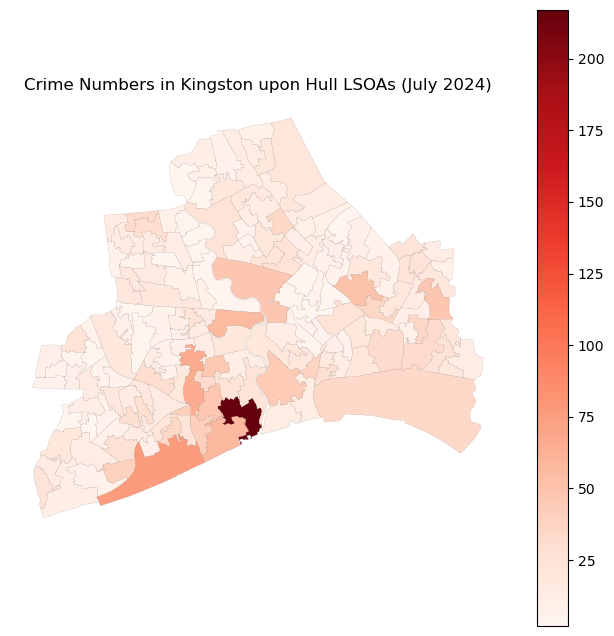
# set the geometry to the df_crime_hull_agg
gdf_crime_hull_agg = pd.merge(gdf_lsoa_hull, df_crime_hull_agg, on='LSOA21CD', how='left')
fig, ax = plt.subplots(figsize=(8, 8))
# plot the crime data
gdf_crime_hull_agg.plot(ax=ax, column='Numbers', cmap='Reds', edgecolor='black', linewidth=0.05, legend=True)
ax.set_title('Crime Numbers in Kingston upon Hull LSOAs (July 2024)')
ax.axis('off')
plt.show()
Q3 solution
# caculate the global moran's I
moran = esda.Moran(gdf_crime_hull_agg['Numbers'].values, w_lsoa_hull)
print(moran.I, moran.p_sim)
0.2315067482911263 0.001
Q4 solution
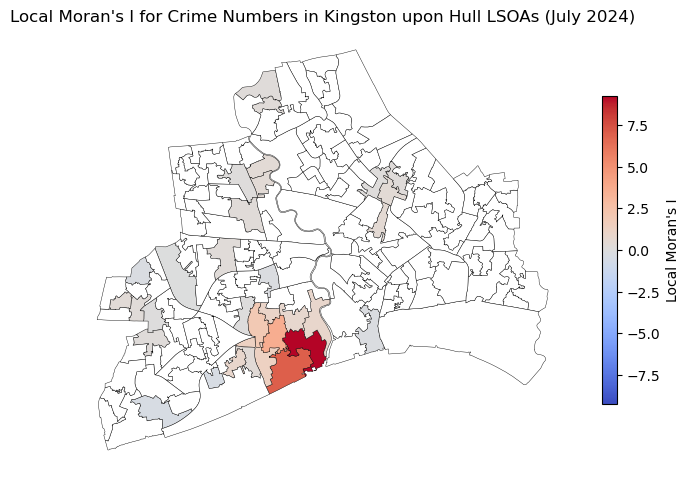
# compute the local moran's I for the crime data
local_moran = esda.Moran_Local(gdf_crime_hull_agg['Numbers'].values, w_lsoa_hull)
# plot the local moran's I
gdf_crime_hull_agg['local_moran'] = local_moran.Is
gdf_crime_hull_agg['local_moran_p'] = local_moran.p_sim
fig, ax = plt.subplots(figsize=(8, 8))
gdf_crime_hull_agg[gdf_crime_hull_agg['local_moran_p'] < 0.05].plot(ax=ax, column='local_moran',
                                                                    cmap='coolwarm', edgecolor='black',
                                                                    linewidth=0.3, legend=True,
                                                                    vmin=-max(local_moran.Is), vmax=max(local_moran.Is),
                                                                    legend_kwds={'shrink': 0.5, 'orientation': 'vertical', 'label': 'Local Moran\'s I'})
# plot the not significant areas
gdf_crime_hull_agg[gdf_crime_hull_agg['local_moran_p'] >= 0.05].plot(ax=ax, color='white', edgecolor='black', linewidth=0.3)
ax.set_title('Local Moran\'s I for Crime Numbers in Kingston upon Hull LSOAs (July 2024)')
ax.axis('off')
(503532.6564838799, 516643.2624241113, 425425.5469577427, 437061.9176401592)
# compute the Getis-Ord Gi* for the crime data
gi = esda.G_Local(gdf_crime_hull_agg['Numbers'].values, w_lsoa_hull)
# add the Getis-Ord Gi* to the gdf_crime_hull_agg
gdf_crime_hull_agg['gi'] = gi.Zs
gdf_crime_hull_agg['gi_p'] = gi.p_sim
# Create a figure and axis
fig, ax = plt.subplots(figsize=(8, 8))

# Plot not significant areas (p_sim >= 0.05)
gdf_crime_hull_agg[gdf_crime_hull_agg['gi_p'] >= 0.05].plot(
    ax=ax, color='white', edgecolor='black', linewidth=0.15)

# Plot cold spots (negative Z-scores and p_sim < 0.05)
gdf_crime_hull_agg[(gdf_crime_hull_agg['gi'] < 0) & (gdf_crime_hull_agg['gi_p'] < 0.05)].plot(
    column='gi',
    ax=ax,
    cmap='Blues',
    legend=True,
    legend_kwds={'shrink': 0.35, 'orientation': 'vertical', 'label': 'Cold Spots (Z<0)'},
    linewidth=0.15)

# Plot hot spots (positive Z-scores and p_sim < 0.05)
gdf_crime_hull_agg[(gdf_crime_hull_agg['gi'] > 0) & (gdf_crime_hull_agg['gi_p'] < 0.05)].plot(
    column='gi',
    ax=ax,
    cmap='Reds',
    legend=True,
    legend_kwds={'shrink': 0.35, 'orientation': 'vertical', 'label': 'Hot Spots (Z>0)'},
    linewidth=0.15)

ax.axis('off')
plt.title('Crime Hotspots and Coldspots in Kingston upon Hull LSOAs (Getis-Ord Gi*)')
plt.show()