
Week7 Lab Tutorial Timeline
Time |
Activity |
|---|---|
16:00–16:05 |
Introduction — Overview of the main tasks for the lab tutorials |
16:05–16:45 |
Tutorial: Clustering for spatial and temporal big data — Follow Section 7.1 of the Jupyter Notebook to practice the GMM, KMeans and DBSCAN |
16:45–17:30 |
Tutorial: Clustering for spatial and temporal big data — Follow Section 7.2-7.3 of the Jupyter Notebook to practice the DB index, Silhouette coefficient and ST-DBSCAN |
17:30–17:55 |
Quiz — Complete quiz tasks |
17:55–18:00 |
Wrap-up — Recap key points and address final questions |
For this module’s lab tutorials, you can download all the required data using the provided link (click).
Please make sure that both the Jupyter Notebook file and the data and img folder are placed in the same directory (specifically within the STBDA_lab folder) to ensure the code runs correctly.
Week 7 Key Takeaways:
Understand the concept of clustering and its applications in spatial and temporal big data.
Learn how to apply clustering algorithms such as Gaussian Mixture Model (GMM), KMeans, and DBSCAN to spatial data.
Explore the use of clustering in road accident data analysis.
Gain insights into parameter tuning in clustering, including the use of Silhouette Coefficient and Davies-Bouldin Index.
Understand the concept of spatial and temporal clustering and its applications in human mobility analysis.
Learn how to apply ST-DBSCAN for clustering spatio-temporal data.
7 Clustering for spatial and temporal big data#
Clustering is a machine learning method (unsupervised learning) that groups a collection of objects into clusters, with each cluster containing objects that are highly similar to each other and distinct from those in other clusters.
7.1 Spatial Clustering#
Spatial clustering is a method used in spatial data analysis to group together objects or data points mainly based on their spatial (geographical) location. The goal is to identify regions/areas where the data points/objects are more similar to each other than to those in other regions/areas.
7.1.1 Gaussian Mixture Model (GMM)#
A Gaussian Mixture Model (GMM) is a probabilistic model that assumes that the data is generated from a mixture of several Gaussian distributions with unknown parameters. The equation for a GMM is a weighted sum of multiple Gaussian (Normal) distributions. The model is defined as:
\(p(x) = \sum_{i=1}^{K} w_i \mathcal{N}({x}|\mu_i, \sigma_i)\)
\( p(x)\) overall probability
\( {x} \) is the data point.
\( K \) is the total number of Gaussian (a normal distribution as a cluster).
\( w_i \) are the weights (size) of the \(i\)th Gaussian (summing to 1).
\( \mathcal{N}({x}|\mu_i, \sigma_i) \) is the probability of the \(i\)th Gaussian.
\(\mu_i\) is the mean of the \(i\)th Gaussian.
\(\sigma_i\) is the variance of the \(i\)th Gaussian.
import pandas as pd
import matplotlib.pyplot as plt
import numpy as np
import warnings
warnings.filterwarnings('ignore')
# Read the data
df = pd.read_csv('data/cluster_data.csv')
df
| Feature1 | Feature2 | |
|---|---|---|
| 0 | 4.862775 | 1.011907 |
| 1 | 5.743938 | 0.472795 |
| 2 | 10.177229 | -1.014992 |
| 3 | -0.405046 | 1.447232 |
| 4 | 1.260348 | 9.982292 |
| ... | ... | ... |
| 495 | 9.447088 | 10.323605 |
| 496 | 5.335410 | 0.273029 |
| 497 | 5.668767 | 2.307601 |
| 498 | 8.489488 | 10.133309 |
| 499 | 6.282093 | -0.258828 |
500 rows × 2 columns
# Plot the data using seaborn
import seaborn as sns
plt.figure(figsize=(10, 8))
g = sns.scatterplot(data=df, x='Feature1', y='Feature2', s=50)
g.set_title('Data for Clustering')
plt.show()
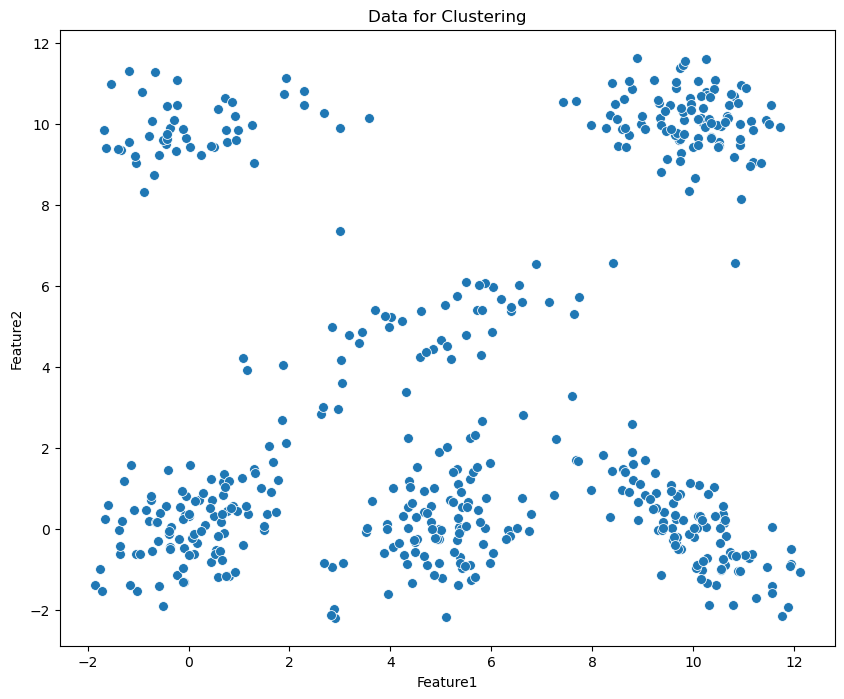
from sklearn.mixture import GaussianMixture
from sklearn.mixture import GaussianMixture
# Define the parameters for GMM
gmm = GaussianMixture(n_components=6, covariance_type='full', random_state=50)
# GMM fitting
gmm.fit(df[['Feature1', 'Feature2']])
# Get labels from clusters
gmm_labels = gmm.predict(df[['Feature1', 'Feature2']])
# Assign the labels of clusters to df
df['gmm_labels']=gmm_labels

# Plot the data with clusters
plt.figure(figsize=(10, 8))
g = sns.scatterplot(data=df, x='Feature1', y='Feature2', hue='gmm_labels', palette='Set1', s=50, legend=True)
g.set_title('GMM Clustering')
g.legend(title='Clusters', loc='center right')
plt.show()
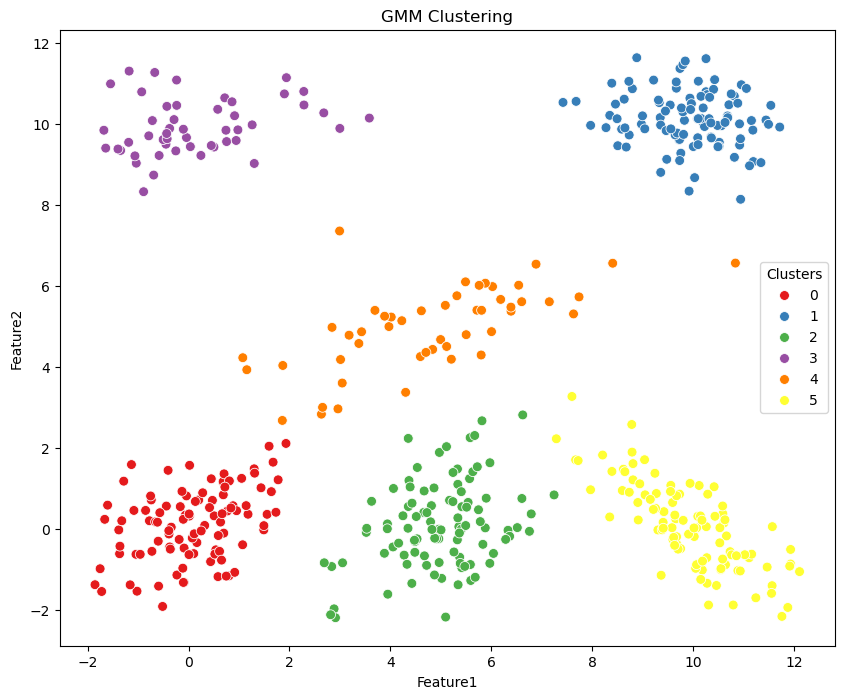
Applying GMM clustering on road accidents
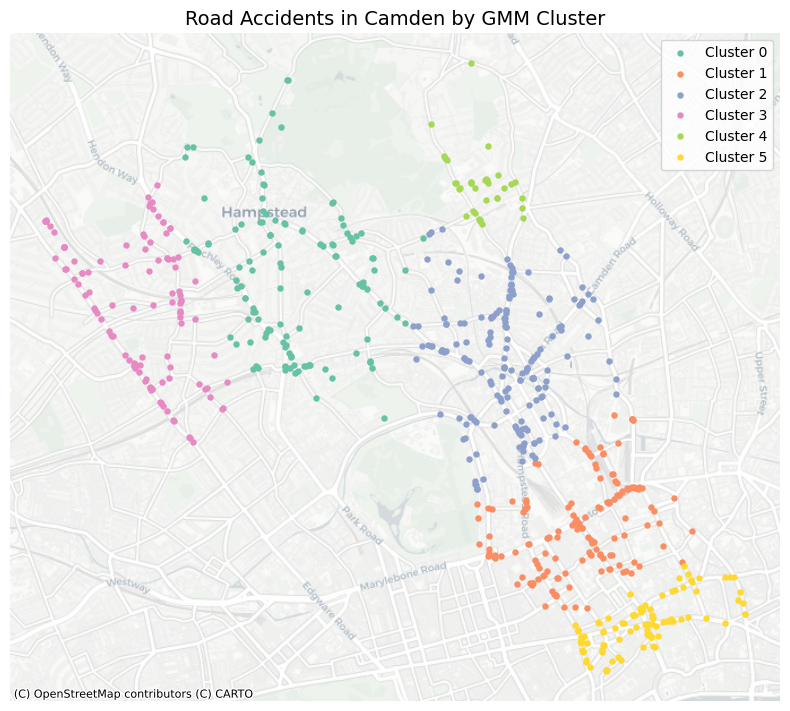
In this section, we will apply GMM to the road accident data in Camden Town, London, to identify clusters of accidents based on their spatial distribution. The dataset contains information about road accidents, including their geographical coordinates. You can find the dataset here.
In spatial analysis, use projected coordinates, such as the UK National Grid, instead of GPS coordinates (latitude and longitude) in clustering.
Projected Coordinates: In a projected coordinate system (e.g., the UK National Grid), distances are measured in consistent units (e.g., meters). This makes the process straightforward to compute distances and areas accurately and make the results understandable.
GPS Coordinates: Latitude and longitude are in degrees, and the actual distance represented by one degree varies depending on the location on the Earth’s surface. The Earth’s curvature affects calculations, requiring more complex spherical trigonometry for accurate distance and area computations.
# Read the road accident data
df_accident = pd.read_csv('data/dft-road-casualty-statistics-collision-2023.csv')
df_accident
| accident_index | accident_year | accident_reference | location_easting_osgr | location_northing_osgr | longitude | latitude | police_force | accident_severity | number_of_vehicles | ... | light_conditions | weather_conditions | road_surface_conditions | special_conditions_at_site | carriageway_hazards | urban_or_rural_area | did_police_officer_attend_scene_of_accident | trunk_road_flag | lsoa_of_accident_location | enhanced_severity_collision | |
|---|---|---|---|---|---|---|---|---|---|---|---|---|---|---|---|---|---|---|---|---|---|
| 0 | 2023010419171 | 2023 | 10419171 | 525060.0 | 170416.0 | -0.202878 | 51.418974 | 1 | 3 | 1 | ... | 4 | 8 | 2 | 0 | 0 | 1 | 1 | 2 | E01003383 | -1 |
| 1 | 2023010419183 | 2023 | 10419183 | 535463.0 | 198745.0 | -0.042464 | 51.671155 | 1 | 3 | 3 | ... | 4 | 1 | 1 | 0 | 0 | 1 | 1 | 2 | E01001547 | -1 |
| 2 | 2023010419189 | 2023 | 10419189 | 508702.0 | 177696.0 | -0.435789 | 51.487777 | 1 | 3 | 2 | ... | 4 | 1 | 1 | 0 | 0 | 1 | 1 | 2 | E01002448 | -1 |
| 3 | 2023010419191 | 2023 | 10419191 | 520341.0 | 190175.0 | -0.263972 | 51.597575 | 1 | 3 | 2 | ... | 4 | 9 | 1 | 0 | 0 | 1 | 1 | 2 | E01000129 | -1 |
| 4 | 2023010419192 | 2023 | 10419192 | 527255.0 | 176963.0 | -0.168976 | 51.477324 | 1 | 3 | 2 | ... | 4 | 1 | 1 | 0 | 0 | 1 | 1 | 2 | E01004583 | -1 |
| ... | ... | ... | ... | ... | ... | ... | ... | ... | ... | ... | ... | ... | ... | ... | ... | ... | ... | ... | ... | ... | ... |
| 104253 | 2023991452286 | 2023 | 991452286 | 246754.0 | 661133.0 | -4.447490 | 55.819059 | 99 | 2 | 1 | ... | 5 | 2 | 2 | -1 | -1 | 1 | 1 | -1 | -1 | 7 |
| 104254 | 2023991452640 | 2023 | 991452640 | 224491.0 | 581627.0 | -4.752200 | 55.097920 | 99 | 3 | 2 | ... | 1 | 9 | 1 | 0 | 0 | 2 | 2 | -1 | -1 | 3 |
| 104255 | 2023991453360 | 2023 | 991453360 | 383341.0 | 806427.0 | -2.276957 | 57.148422 | 99 | 3 | 2 | ... | 4 | 2 | 2 | -1 | -1 | 1 | 1 | -1 | -1 | 3 |
| 104256 | 2023991461915 | 2023 | 991461915 | 271662.0 | 655488.0 | -4.047591 | 55.775637 | 99 | 3 | 1 | ... | 4 | 8 | 1 | -1 | -1 | 1 | 1 | -1 | -1 | 3 |
| 104257 | 2023991462793 | 2023 | 991462793 | 327349.0 | 666746.0 | -3.163102 | 55.888350 | 99 | 3 | 2 | ... | 1 | 1 | 1 | 0 | 0 | 2 | 1 | -1 | -1 | 3 |
104258 rows × 37 columns
df_accident.columns
Index(['accident_index', 'accident_year', 'accident_reference',
       'location_easting_osgr', 'location_northing_osgr', 'longitude',
       'latitude', 'police_force', 'accident_severity', 'number_of_vehicles',
       'number_of_casualties', 'date', 'day_of_week', 'time',
       'local_authority_district', 'local_authority_ons_district',
       'local_authority_highway', 'first_road_class', 'first_road_number',
       'road_type', 'speed_limit', 'junction_detail', 'junction_control',
       'second_road_class', 'second_road_number',
       'pedestrian_crossing_human_control',
       'pedestrian_crossing_physical_facilities', 'light_conditions',
       'weather_conditions', 'road_surface_conditions',
       'special_conditions_at_site', 'carriageway_hazards',
       'urban_or_rural_area', 'did_police_officer_attend_scene_of_accident',
       'trunk_road_flag', 'lsoa_of_accident_location',
       'enhanced_severity_collision'],
      dtype='object')
# Camden Town LSOA index
camden_lsoas = ['E01000936', 'E01000937', 'E01000964', 'E01000934', 'E01000935', 'E01000942', 'E01000932', 'E01000933',
                'E01000930', 'E01000931', 'E01000938', 'E01000939', 'E01000943', 'E01000916', 'E01000917', 'E01000914',
                'E01000915', 'E01000912', 'E01000913', 'E01000910', 'E01000911', 'E01000918', 'E01000919', 'E01000876',
                'E01000877', 'E01000874', 'E01000875', 'E01000872', 'E01000873', 'E01000870', 'E01000871', 'E01000878',
                'E01000879', 'E01000966', 'E01000940', 'E01000967', 'E01000965', 'E01000962', 'E01000963', 'E01000960',
                'E01000961', 'E01000941', 'E01000968', 'E01000949', 'E01000969', 'E01000856', 'E01000857', 'E01000854',
                'E01000855', 'E01000852', 'E01000853', 'E01000850', 'E01000851', 'E01000858', 'E01000859', 'E01000946',
                'E01000947', 'E01000944', 'E01000890', 'E01000899', 'E01000945', 'E01000948', 'E01000926', 'E01000927',
                'E01000924', 'E01000925', 'E01000922', 'E01000905', 'E01000923', 'E01000955', 'E01000920', 'E01000921',
                'E01000928', 'E01000929', 'E01000950', 'E01000897', 'E01000896', 'E01000895', 'E01000894', 'E01000893',
                'E01000892', 'E01000891', 'E01000898', 'E01000906', 'E01000907', 'E01000904', 'E01000902', 'E01000903',
                'E01000900', 'E01000901', 'E01000908', 'E01000909', 'E01000866', 'E01000867', 'E01000951', 'E01000864',
                'E01000865', 'E01000862', 'E01000863', 'E01000860', 'E01000861', 'E01000868', 'E01000869', 'E01000846',
                'E01000847', 'E01000844', 'E01000845', 'E01000842', 'E01000843', 'E01000848', 'E01000849', 'E01000974',
                'E01000972', 'E01000973', 'E01000970', 'E01000971', 'E01000956', 'E01000957', 'E01000954', 'E01000952',
                'E01000953', 'E01000958', 'E01000959', 'E01000887', 'E01000886', 'E01000885', 'E01000884', 'E01000883',
                'E01000882', 'E01000881', 'E01000880', 'E01000889', 'E01000888']
print('The number of LSOAs in Camden Town:', len(camden_lsoas))
The number of LSOAs in Camden Town: 133
df_accident_camden = df_accident.query('lsoa_of_accident_location in @camden_lsoas')
df_accident_camden
| accident_index | accident_year | accident_reference | location_easting_osgr | location_northing_osgr | longitude | latitude | police_force | accident_severity | number_of_vehicles | ... | light_conditions | weather_conditions | road_surface_conditions | special_conditions_at_site | carriageway_hazards | urban_or_rural_area | did_police_officer_attend_scene_of_accident | trunk_road_flag | lsoa_of_accident_location | enhanced_severity_collision | |
|---|---|---|---|---|---|---|---|---|---|---|---|---|---|---|---|---|---|---|---|---|---|
| 5 | 2023010419198 | 2023 | 10419198 | 524780.0 | 184471.0 | -0.201941 | 51.545349 | 1 | 3 | 1 | ... | 4 | 1 | 1 | 0 | 0 | 1 | 1 | 2 | E01000974 | -1 |
| 20 | 2023010419281 | 2023 | 10419281 | 525522.0 | 184858.0 | -0.191108 | 51.548662 | 1 | 2 | 1 | ... | 4 | 2 | 2 | 0 | 0 | 1 | 1 | 2 | E01000973 | -1 |
| 21 | 2023010419282 | 2023 | 10419282 | 530049.0 | 184288.0 | -0.126067 | 51.542516 | 1 | 3 | 1 | ... | 4 | 2 | 2 | 0 | 0 | 1 | 1 | 2 | E01000868 | -1 |
| 48 | 2023010419391 | 2023 | 10419391 | 528183.0 | 184396.0 | -0.152921 | 51.543913 | 1 | 2 | 2 | ... | 4 | 1 | 1 | 0 | 0 | 1 | 1 | 2 | E01000906 | -1 |
| 52 | 2023010419398 | 2023 | 10419398 | 526452.0 | 185517.0 | -0.177466 | 51.554377 | 1 | 3 | 2 | ... | 4 | 1 | 1 | 0 | 0 | 1 | 3 | 2 | E01000879 | -1 |
| ... | ... | ... | ... | ... | ... | ... | ... | ... | ... | ... | ... | ... | ... | ... | ... | ... | ... | ... | ... | ... | ... |
| 22654 | 2023010487700 | 2023 | 10487700 | 529836.0 | 181379.0 | -0.130208 | 51.516423 | 1 | 2 | 1 | ... | 4 | 1 | 1 | 0 | 9 | 1 | 3 | 2 | E01000855 | -1 |
| 22687 | 2023010491078 | 2023 | 10491078 | 529537.0 | 181828.0 | -0.134350 | 51.520526 | 1 | 3 | 2 | ... | 1 | 1 | 1 | 9 | 0 | 1 | 3 | 2 | E01000851 | -1 |
| 22695 | 2023010494344 | 2023 | 10494344 | 526857.0 | 184926.0 | -0.171841 | 51.548975 | 1 | 2 | 2 | ... | 1 | 1 | 1 | 0 | 0 | 1 | 1 | 2 | E01000882 | -1 |
| 22731 | 2023011366792 | 2023 | 11366792 | 530953.0 | 181613.0 | -0.114033 | 51.518268 | 1 | 3 | 2 | ... | 1 | 1 | 1 | 0 | 0 | 1 | 1 | 2 | E01000914 | 3 |
| 87863 | 2023481407567 | 2023 | 481407567 | 531350.0 | 181567.0 | -0.108331 | 51.517763 | 48 | 2 | 1 | ... | 4 | 8 | 2 | 0 | 0 | 1 | 3 | 2 | E01000917 | 5 |
722 rows × 37 columns
# we notice only 125/133 LSOAs have road accidents in Camden Town, 2023
df_accident_camden.lsoa_of_accident_location.nunique()
125
# plot the data using folium
import folium
# Create a map centered around Camden Town
m = folium.Map(location=[51.5416, -0.1425], zoom_start=13)
# we use the basemap layer from cartoons
folium.TileLayer('cartodb positron').add_to(m)
# Add road accidents to the map
for _, row in df_accident_camden.iterrows():
    folium.CircleMarker(
        location=[row['latitude'], row['longitude']],
        radius=3,
        color='Royalblue',
        fill=True,
        fill_color='Royalblue',
        fill_opacity=0.8
    ).add_to(m)
m
df_accident_camden[['location_easting_osgr', 'location_northing_osgr']]
| location_easting_osgr | location_northing_osgr | |
|---|---|---|
| 5 | 524780.0 | 184471.0 |
| 20 | 525522.0 | 184858.0 |
| 21 | 530049.0 | 184288.0 |
| 48 | 528183.0 | 184396.0 |
| 52 | 526452.0 | 185517.0 |
| ... | ... | ... |
| 22654 | 529836.0 | 181379.0 |
| 22687 | 529537.0 | 181828.0 |
| 22695 | 526857.0 | 184926.0 |
| 22731 | 530953.0 | 181613.0 |
| 87863 | 531350.0 | 181567.0 |
722 rows × 2 columns
# clustering the road accidents using GMM
gmm = GaussianMixture(n_components=6, covariance_type='full', random_state=50)
# GMM fitting
gmm.fit(df_accident_camden[['location_easting_osgr', 'location_northing_osgr']])
# Get labels from clusters
gmm_labels = gmm.predict(df_accident_camden[['location_easting_osgr', 'location_northing_osgr']])
# put the labels to the df
df_accident_camden['gmm_labels'] = gmm_labels
df_accident_camden
| accident_index | accident_year | accident_reference | location_easting_osgr | location_northing_osgr | longitude | latitude | police_force | accident_severity | number_of_vehicles | ... | weather_conditions | road_surface_conditions | special_conditions_at_site | carriageway_hazards | urban_or_rural_area | did_police_officer_attend_scene_of_accident | trunk_road_flag | lsoa_of_accident_location | enhanced_severity_collision | gmm_labels | |
|---|---|---|---|---|---|---|---|---|---|---|---|---|---|---|---|---|---|---|---|---|---|
| 5 | 2023010419198 | 2023 | 10419198 | 524780.0 | 184471.0 | -0.201941 | 51.545349 | 1 | 3 | 1 | ... | 1 | 1 | 0 | 0 | 1 | 1 | 2 | E01000974 | -1 | 3 |
| 20 | 2023010419281 | 2023 | 10419281 | 525522.0 | 184858.0 | -0.191108 | 51.548662 | 1 | 2 | 1 | ... | 2 | 2 | 0 | 0 | 1 | 1 | 2 | E01000973 | -1 | 3 |
| 21 | 2023010419282 | 2023 | 10419282 | 530049.0 | 184288.0 | -0.126067 | 51.542516 | 1 | 3 | 1 | ... | 2 | 2 | 0 | 0 | 1 | 1 | 2 | E01000868 | -1 | 2 |
| 48 | 2023010419391 | 2023 | 10419391 | 528183.0 | 184396.0 | -0.152921 | 51.543913 | 1 | 2 | 2 | ... | 1 | 1 | 0 | 0 | 1 | 1 | 2 | E01000906 | -1 | 2 |
| 52 | 2023010419398 | 2023 | 10419398 | 526452.0 | 185517.0 | -0.177466 | 51.554377 | 1 | 3 | 2 | ... | 1 | 1 | 0 | 0 | 1 | 3 | 2 | E01000879 | -1 | 0 |
| ... | ... | ... | ... | ... | ... | ... | ... | ... | ... | ... | ... | ... | ... | ... | ... | ... | ... | ... | ... | ... | ... |
| 22654 | 2023010487700 | 2023 | 10487700 | 529836.0 | 181379.0 | -0.130208 | 51.516423 | 1 | 2 | 1 | ... | 1 | 1 | 0 | 9 | 1 | 3 | 2 | E01000855 | -1 | 5 |
| 22687 | 2023010491078 | 2023 | 10491078 | 529537.0 | 181828.0 | -0.134350 | 51.520526 | 1 | 3 | 2 | ... | 1 | 1 | 9 | 0 | 1 | 3 | 2 | E01000851 | -1 | 1 |
| 22695 | 2023010494344 | 2023 | 10494344 | 526857.0 | 184926.0 | -0.171841 | 51.548975 | 1 | 2 | 2 | ... | 1 | 1 | 0 | 0 | 1 | 1 | 2 | E01000882 | -1 | 0 |
| 22731 | 2023011366792 | 2023 | 11366792 | 530953.0 | 181613.0 | -0.114033 | 51.518268 | 1 | 3 | 2 | ... | 1 | 1 | 0 | 0 | 1 | 1 | 2 | E01000914 | 3 | 5 |
| 87863 | 2023481407567 | 2023 | 481407567 | 531350.0 | 181567.0 | -0.108331 | 51.517763 | 48 | 2 | 1 | ... | 8 | 2 | 0 | 0 | 1 | 3 | 2 | E01000917 | 5 | 5 |
722 rows × 38 columns
import matplotlib.pyplot as plt
import matplotlib.colors as mcolors
import contextily as ctx
import geopandas as gpd
from shapely.geometry import Point

# Create a GeoDataFrame from the DataFrame
geometry = [Point(xy) for xy in zip(df_accident_camden['longitude'], df_accident_camden['latitude'])]
gdf = gpd.GeoDataFrame(df_accident_camden, geometry=geometry, crs="EPSG:4326")

# Project to Web Mercator (required by contextily)
gdf = gdf.to_crs(epsg=3857)

# Generate color palette
palette = sns.color_palette("Set2", n_colors=6)
hex_colors = [mcolors.to_hex(color) for color in palette]

# Plot
fig, ax = plt.subplots(figsize=(8, 8))
for label in sorted(gdf['gmm_labels'].unique()):
    gdf[gdf['gmm_labels'] == label].plot(
        ax=ax,
        markersize=13,
        color=hex_colors[label],
        label=f"Cluster {label}"
    )

# Add basemap (CartoDB Positron)
ctx.add_basemap(ax, source=ctx.providers.CartoDB.Positron)

# plot
ax.set_axis_off()
plt.legend()
plt.title("Road Accidents in Camden by GMM Cluster", fontsize=14)
plt.tight_layout()
plt.show()
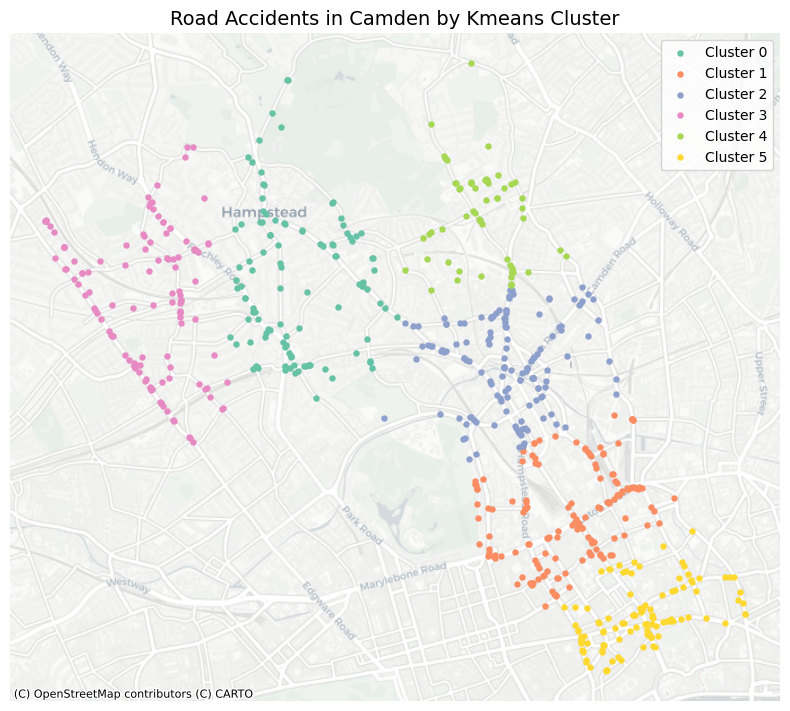
7.1.2 KMeans#
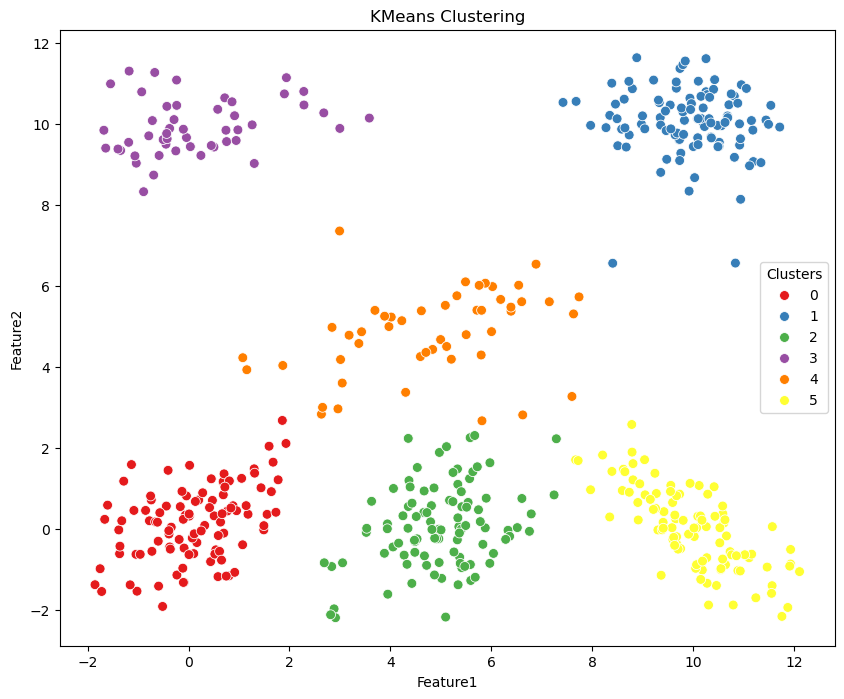
KMeans is a clustering method that divides data into K separate clusters, ensuring each data point is assigned to the cluster whose mean (centroid) is closest, determined by its features.
from sklearn.cluster import KMeans
# Define the parameters for KMeans
kmeans = KMeans(n_clusters=6, random_state=50)
# KMeans fitting
kmeans.fit(df[['Feature1', 'Feature2']])
# Generating labels
kmeans_labels = kmeans.predict(df[['Feature1', 'Feature2']])
# Assign the labels of clusters to df
df['kmeans_labels'] = kmeans_labels
# Plot the data with clusters
plt.figure(figsize=(10, 8))
g = sns.scatterplot(data=df, x='Feature1', y='Feature2', hue='kmeans_labels', palette='Set1', s=50, legend=True)
g.set_title('KMeans Clustering')
g.legend(title='Clusters', loc='center right')
plt.show()
Applying KMeans clustering on road accidents
# KMeans clustering on road accidents in Camden Town
kmeans = KMeans(n_clusters=6, random_state=50)
# KMeans fitting
kmeans.fit(df_accident_camden[['location_easting_osgr', 'location_northing_osgr']])
# Generating labels
kmeans_labels = kmeans.predict(df_accident_camden[['location_easting_osgr', 'location_northing_osgr']])
# put the labels to the df and gdf
df_accident_camden['kmeans_labels'] = kmeans_labels
gdf['kmeans_labels'] = kmeans_labels
# Plot the data with clusters
fig, ax = plt.subplots(figsize=(8, 8))
for label in sorted(gdf['kmeans_labels'].unique()):
    gdf[gdf['kmeans_labels'] == label].plot(
        ax=ax,
        markersize=13,
        color=hex_colors[label],
        label=f"Cluster {label}"
    )

# Add basemap (CartoDB Positron)
ctx.add_basemap(ax, source=ctx.providers.CartoDB.Positron)

# plot
ax.set_axis_off()
plt.legend()
plt.title("Road Accidents in Camden by Kmeans Cluster", fontsize=14)
plt.tight_layout()
plt.show()
7.1.3 DBSCAN#
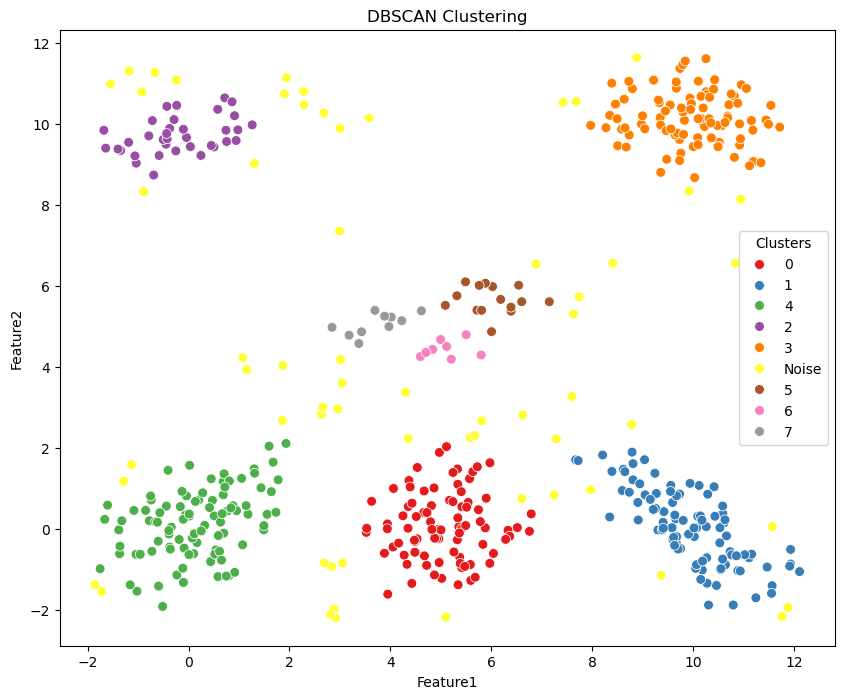
Density-based spatial clustering of applications with noise is a popular density-based clustering algorithm. Unlike partition-based methods like KMeans, DBSCAN is capable of finding clusters of arbitrary shapes and handling noise in the data.
Key Parameters:
eps (epsilon): The maximum distance between two points for one to be considered as in the neighborhood of the other.
min_samples: The number of points (pts) in a neighborhood for a pt to be considered as a core pt (This includes the pt itself).
from sklearn.cluster import DBSCAN
# Define the parameters for DBSCAN
dbscan = DBSCAN(eps=0.6, min_samples=5)
# DBSACn implementing
dbscan.fit(df[['Feature1', 'Feature2']])
DBSCAN(eps=0.6)In a Jupyter environment, please rerun this cell to show the HTML representation or trust the notebook.
On GitHub, the HTML representation is unable to render, please try loading this page with nbviewer.org.
DBSCAN(eps=0.6)
# Generating the labels
df['dbscan_labels'] = dbscan.labels_
print('The numbers of clusters from DBSCAN:', df['dbscan_labels'].nunique()-1)
# We replace -1 with Noise
df.dbscan_labels = df.dbscan_labels.replace({-1:'Noise'})
The numbers of clusters from DBSCAN: 8
# Plot the data with clusters
plt.figure(figsize=(10, 8))
g = sns.scatterplot(data=df, x='Feature1', y='Feature2', hue='dbscan_labels', palette='Set1', s=50, legend=True)
g.set_title('DBSCAN Clustering')
g.legend(title='Clusters', loc='center right')
plt.show()
Applying DBSCAN clustering on road accidents
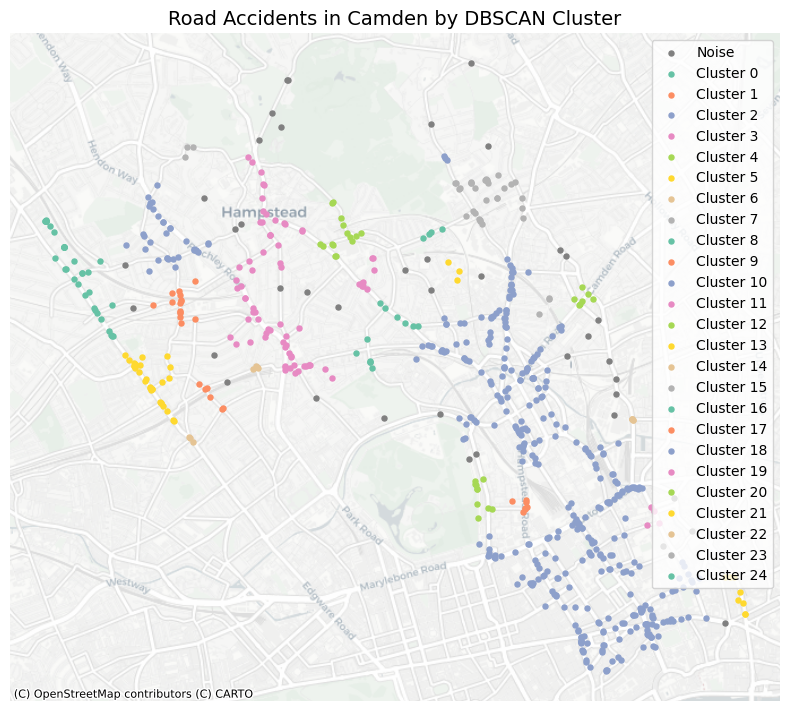
# Define the parameters for DBSCAN, 200 means in meters, then for each cluster,
# each point is within 200 meters of at least 3 other points.
dbscan = DBSCAN(eps=200, min_samples=3)
# DBSACn implementing
dbscan.fit(df_accident_camden[['location_easting_osgr',
                               'location_northing_osgr']])
# Generating the labels
gdf['dbscan_labels'] = dbscan.labels_
print('The numbers of clusters from DBSCAN:',
      gdf['dbscan_labels'].nunique()-1)
The numbers of clusters from DBSCAN: 25
# define the colors for clusters
palette = sns.color_palette("Set2", n_colors=gdf['dbscan_labels'].nunique()-1)
hex_colors = [mcolors.to_hex(color) for color in palette]
# Plot the data with clusters
fig, ax = plt.subplots(figsize=(8, 8))
for label in sorted(gdf['dbscan_labels'].unique()):
    if label != -1:  # Exclude noise points
        gdf[gdf['dbscan_labels'] == label].plot(
            ax=ax,
            markersize=13,
            color=hex_colors[label],
            label=f"Cluster {label}"
        )
    else:
        gdf[gdf['dbscan_labels'] == label].plot(
            ax=ax,
            markersize=13,
            color='gray',
            label='Noise'
        )
# Add basemap (CartoDB Positron)
ctx.add_basemap(ax, source=ctx.providers.CartoDB.Positron)
# plot
ax.set_axis_off()
plt.legend()
plt.title("Road Accidents in Camden by DBSCAN Cluster", fontsize=14)
plt.tight_layout()
plt.show()
Interpretation:
Though we can see that the clusters from GMM and KMeans are similar, DBSCAN identify more clusters and noise points. This is because DBSCAN is a density-based clustering algorithm, which can find clusters of arbitrary shapes and handle noise in the data. In application, local clusters of road accidents can be identified using DBSCAN, which can help to identify areas with high accident rates and potential hotspots for road safety interventions.
7.2 HyperParameter in clustering#
Metrics assess the effectiveness of clustering outcomes. By evaluating various clustering algorithms to select the optimal one or adjusting parameters within the same algorithm for tuning purposes (e.g., selecting the numbers of clusters), we can determine which configuration produces clusters that aligned with our domain knowledge.
Related metrics for clustering in sklearn can be found here
7.2.1 Silhouette coefficient#
The Silhouette Coefficient is a metric used to evaluate the quality of clustering in unsupervised learning. It measures how similar each data point is to its own cluster compared to other clusters.
\(s(i) = \frac{b(i) - a(i)}{\max(a(i), b(i))}\)
\(s(i)\) represents the Silhouette Coefficient for data point \(i\).
\(a(i)\) is the average distance from to all other points within the same cluster (intra-cluster distance).
\(b(i)\) is the minimum average distance from i to points in any other cluster (inter-cluster distance).
\( max(a(i),b(i))\) ensures \(s(i)\) that is normalized to range between -1 and +1.
Interpretation:
\(s(i)\) near +1 indicates that point \(i\) is well-clustered, with its distance to points in its own cluster significantly smaller than its distance to points in neighboring clusters.
\(s(i)\) near 0 indicates that point \(i\) is on or very close to the decision boundary between two neighboring clusters.
\(s(i)\) near -1 indicates that point \(i\) may have been assigned to the wrong cluster.
from sklearn.metrics import silhouette_score

# This function returns the mean Silhouette Coefficient of all samples.
# We calculate the gmm clusters for an example
silhouette_avg = silhouette_score(df[['Feature1', 'Feature2']], df['gmm_labels'])
print("Silhouette Coefficient:", silhouette_avg)
Silhouette Coefficient: 0.6583554245759751
7.2.2 Davies-Bouldin Index#
The Davies-Bouldin Index provides a measure of the average similarity between each cluster.
\( DB = \frac{1}{n} \sum_{i=1}^{n} \max_{j \neq i} \left( \frac{S_i + S_j}{d(c_i, c_j)} \right) \)
\(n\) is the number of clusters.
\(S_i\) is the average distance between each point in cluster \(i\) and the centroid \(c_i\).
\(d(c_i, c_j)\) is the distance between centroids \(c_i\) and \(c_j\).
\(\max_{j \neq i} \left( \frac{S_i + S_j}{d(c_i, c_j)} \right)\) computes the maximum similarity measure (Euclidean distance) between cluster \(i\) and any other cluster \(j\).
Interpretation:
Lower values of DB indicate better-defined and well-separated clusters.
from sklearn.metrics import davies_bouldin_score

# Compute Davies-Bouldin Index
# We calculate the gmm clusters for an example
db_index = davies_bouldin_score(df[['Feature1', 'Feature2']], df['gmm_labels'])
print("Davies-Bouldin Index:", db_index)
Davies-Bouldin Index: 0.5099268217594325
7.2.3 Parameter tuning process#
Example: optimising the numbers of clusters using Silhouette Scores and DB index in GMM
# Define the range for the number of clusters
cluster_range = range(2, 11)

# Initialize lists to store metric scores
silhouette_scores = []
davies_bouldin_scores = []

for n_clusters in cluster_range:
    # Fit GMM model using different cluster numbers
    gmm = GaussianMixture(n_components=n_clusters, random_state=42)
    gmm.fit(df[['Feature1', 'Feature2']])

    # Generating labels
    labels = gmm.predict(df[['Feature1', 'Feature2']])

    # Calculate Silhouette Coefficient
    silhouette_avg = silhouette_score(df[['Feature1', 'Feature2']], labels)
    silhouette_scores.append(silhouette_avg)

    # Calculate Davies-Bouldin Index
    db_index = davies_bouldin_score(df[['Feature1', 'Feature2']], labels)
    davies_bouldin_scores.append(db_index)

    print(f'Number of clusters: {n_clusters}')
    print(f'Silhouette Coefficient: {silhouette_avg}')
    print(f'Davies-Bouldin Index: {db_index}\n')
Number of clusters: 2
Silhouette Coefficient: 0.4759573267675314
Davies-Bouldin Index: 0.9428541532461406

Number of clusters: 3
Silhouette Coefficient: 0.49528077888296457
Davies-Bouldin Index: 0.7161162630982991

Number of clusters: 4
Silhouette Coefficient: 0.5615867904177323
Davies-Bouldin Index: 0.5269555531806575

Number of clusters: 5
Silhouette Coefficient: 0.6167432592503065
Davies-Bouldin Index: 0.5778207829980668

Number of clusters: 6
Silhouette Coefficient: 0.6583554245759751
Davies-Bouldin Index: 0.5099268217594325

Number of clusters: 7
Silhouette Coefficient: 0.582565242046876
Davies-Bouldin Index: 0.5994514303332313

Number of clusters: 8
Silhouette Coefficient: 0.5642378840860819
Davies-Bouldin Index: 0.7263834300455105

Number of clusters: 9
Silhouette Coefficient: 0.5271595593685239
Davies-Bouldin Index: 1.0159927193940836

Number of clusters: 10
Silhouette Coefficient: 0.5212884507182589
Davies-Bouldin Index: 0.983680222721036
# Plotting the metrics with cluster numbers
fig, ax = plt.subplots(1, 2, figsize=(12, 6))
sns.lineplot(x=cluster_range, y=silhouette_scores, marker='o', size=20, ax=ax[0], legend=False)
ax[0].set_title('Silhouette Coefficient')
ax[0].set_xlabel('Number of clusters')
ax[0].set_ylabel('Silhouette Coefficient')

sns.lineplot(x=cluster_range, y=davies_bouldin_scores, marker='o', size=20 ,ax=ax[1], legend=False)
ax[1].set_title('Davies-Bouldin Index')
ax[1].set_xlabel('Number of clusters')
ax[1].set_ylabel('Davies-Bouldin Index')
plt.show()
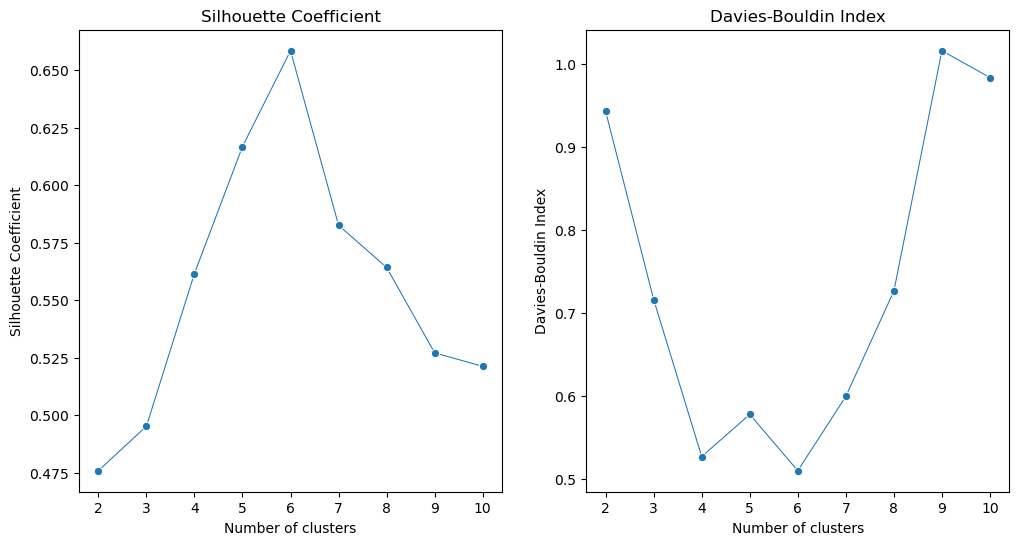
In summary, we can identify the optimal cluster number (6) in this clustering task where the Silhouette Coefficient is highest and the Davies-Bouldin Index is lowest.
The selection of numbers of clusters in DBSCAN clustering:
In DBSCAN, using the index may not get the optimal numbers of clusters as the DB index and Silhouette Coefficient cannot reach the lowest or highest values. For lots of cases, the numbers of clusters in DBSCAN are determined by the domain knowledge and the parameters of DBSCAN, such as eps and min_samples. For example, 500 m is a reasonable distance for some urban analysis as 500 meters is a reasonable distance for people to walk (or around a place) so can be represented for some clustering in urban analysis.
7.3 Spatial and Temporal Clustering#
Spatial and temporal clustering combines spatial and temporal dimensions to analyze data that varies over both space and time. This approach is particularly useful in applications such as environmental monitoring, traffic analysis, and social media trend analysis, where data points are not only located in space but also change over time.
For example, for human mobility data, we can cluster the data based on both spatial and temporal dimensions to identify patterns of human movement in a specific area over time. This can help to understand how people move in and out of an area, how long they stay, and how their movement patterns change over time. Or in crime science, the spatial and temporal clustering can be used to identify the near repeat patterns of crime, which can help to understand the patterns of crime in a specific area over time (ref paper).
ST-DBSCAN
Spatio-Temporal Density-Based Spatial Clustering of Applications with Noise. It’s an extension of the classic DBSCAN clustering algorithm designed specifically for spatio-temporal data — that is, data with both spatial (location) and temporal (time) components.
eps1: Spatial distance threshold (like radius in regular DBSCAN).
eps2: Temporal distance threshold.
minPts: Minimum number of points needed to form a dense region.
You can find the ST-DBSCAN doc here
We will use the mobile phone GPS data to identify the visiting behavior from the spatial and temporal patterns of human mobility using ST-DBSCAN. The data is from GeoLife GPS Trajectories. This GPS trajectory dataset was collected in the (Microsoft Research Asia) Geolife project by 182 users in a period of over three years (from April 2007 to August 2012).
# Read the all gps points from 001 user
import glob
path = 'data/Geolife Trajectories 1.3/Data/001/Trajectory/*.plt'
all_files = glob.glob(path)
all_files.sort()  # Sort the files to ensure they are in order
print(len(all_files), all_files)
71 ['data/Geolife Trajectories 1.3/Data/001/Trajectory/20081023055305.plt', 'data/Geolife Trajectories 1.3/Data/001/Trajectory/20081023234104.plt', 'data/Geolife Trajectories 1.3/Data/001/Trajectory/20081024234405.plt', 'data/Geolife Trajectories 1.3/Data/001/Trajectory/20081025231428.plt', 'data/Geolife Trajectories 1.3/Data/001/Trajectory/20081026081229.plt', 'data/Geolife Trajectories 1.3/Data/001/Trajectory/20081027111634.plt', 'data/Geolife Trajectories 1.3/Data/001/Trajectory/20081027233029.plt', 'data/Geolife Trajectories 1.3/Data/001/Trajectory/20081027235802.plt', 'data/Geolife Trajectories 1.3/Data/001/Trajectory/20081028102805.plt', 'data/Geolife Trajectories 1.3/Data/001/Trajectory/20081028233053.plt', 'data/Geolife Trajectories 1.3/Data/001/Trajectory/20081028235048.plt', 'data/Geolife Trajectories 1.3/Data/001/Trajectory/20081029110529.plt', 'data/Geolife Trajectories 1.3/Data/001/Trajectory/20081029234123.plt', 'data/Geolife Trajectories 1.3/Data/001/Trajectory/20081030233959.plt', 'data/Geolife Trajectories 1.3/Data/001/Trajectory/20081101004235.plt', 'data/Geolife Trajectories 1.3/Data/001/Trajectory/20081102030834.plt', 'data/Geolife Trajectories 1.3/Data/001/Trajectory/20081102233452.plt', 'data/Geolife Trajectories 1.3/Data/001/Trajectory/20081103133204.plt', 'data/Geolife Trajectories 1.3/Data/001/Trajectory/20081103233729.plt', 'data/Geolife Trajectories 1.3/Data/001/Trajectory/20081104054859.plt', 'data/Geolife Trajectories 1.3/Data/001/Trajectory/20081104234436.plt', 'data/Geolife Trajectories 1.3/Data/001/Trajectory/20081105110052.plt', 'data/Geolife Trajectories 1.3/Data/001/Trajectory/20081106051423.plt', 'data/Geolife Trajectories 1.3/Data/001/Trajectory/20081106133604.plt', 'data/Geolife Trajectories 1.3/Data/001/Trajectory/20081106233404.plt', 'data/Geolife Trajectories 1.3/Data/001/Trajectory/20081108034358.plt', 'data/Geolife Trajectories 1.3/Data/001/Trajectory/20081109033335.plt', 'data/Geolife Trajectories 1.3/Data/001/Trajectory/20081110233534.plt', 'data/Geolife Trajectories 1.3/Data/001/Trajectory/20081111114304.plt', 'data/Geolife Trajectories 1.3/Data/001/Trajectory/20081111234235.plt', 'data/Geolife Trajectories 1.3/Data/001/Trajectory/20081112234504.plt', 'data/Geolife Trajectories 1.3/Data/001/Trajectory/20081113121334.plt', 'data/Geolife Trajectories 1.3/Data/001/Trajectory/20081113234558.plt', 'data/Geolife Trajectories 1.3/Data/001/Trajectory/20081114130723.plt', 'data/Geolife Trajectories 1.3/Data/001/Trajectory/20081115003535.plt', 'data/Geolife Trajectories 1.3/Data/001/Trajectory/20081116024429.plt', 'data/Geolife Trajectories 1.3/Data/001/Trajectory/20081116235322.plt', 'data/Geolife Trajectories 1.3/Data/001/Trajectory/20081117042454.plt', 'data/Geolife Trajectories 1.3/Data/001/Trajectory/20081117234459.plt', 'data/Geolife Trajectories 1.3/Data/001/Trajectory/20081118003844.plt', 'data/Geolife Trajectories 1.3/Data/001/Trajectory/20081118132804.plt', 'data/Geolife Trajectories 1.3/Data/001/Trajectory/20081118235053.plt', 'data/Geolife Trajectories 1.3/Data/001/Trajectory/20081119104736.plt', 'data/Geolife Trajectories 1.3/Data/001/Trajectory/20081120121822.plt', 'data/Geolife Trajectories 1.3/Data/001/Trajectory/20081120234905.plt', 'data/Geolife Trajectories 1.3/Data/001/Trajectory/20081201102704.plt', 'data/Geolife Trajectories 1.3/Data/001/Trajectory/20081202000605.plt', 'data/Geolife Trajectories 1.3/Data/001/Trajectory/20081202145929.plt', 'data/Geolife Trajectories 1.3/Data/001/Trajectory/20081203000505.plt', 'data/Geolife Trajectories 1.3/Data/001/Trajectory/20081203112659.plt', 'data/Geolife Trajectories 1.3/Data/001/Trajectory/20081203235305.plt', 'data/Geolife Trajectories 1.3/Data/001/Trajectory/20081204142253.plt', 'data/Geolife Trajectories 1.3/Data/001/Trajectory/20081205002359.plt', 'data/Geolife Trajectories 1.3/Data/001/Trajectory/20081205143505.plt', 'data/Geolife Trajectories 1.3/Data/001/Trajectory/20081205235730.plt', 'data/Geolife Trajectories 1.3/Data/001/Trajectory/20081206040725.plt', 'data/Geolife Trajectories 1.3/Data/001/Trajectory/20081206083854.plt', 'data/Geolife Trajectories 1.3/Data/001/Trajectory/20081206084030.plt', 'data/Geolife Trajectories 1.3/Data/001/Trajectory/20081207030135.plt', 'data/Geolife Trajectories 1.3/Data/001/Trajectory/20081208001534.plt', 'data/Geolife Trajectories 1.3/Data/001/Trajectory/20081208142853.plt', 'data/Geolife Trajectories 1.3/Data/001/Trajectory/20081209002004.plt', 'data/Geolife Trajectories 1.3/Data/001/Trajectory/20081210001529.plt', 'data/Geolife Trajectories 1.3/Data/001/Trajectory/20081210080559.plt', 'data/Geolife Trajectories 1.3/Data/001/Trajectory/20081210235522.plt', 'data/Geolife Trajectories 1.3/Data/001/Trajectory/20081211110523.plt', 'data/Geolife Trajectories 1.3/Data/001/Trajectory/20081212000534.plt', 'data/Geolife Trajectories 1.3/Data/001/Trajectory/20081212141923.plt', 'data/Geolife Trajectories 1.3/Data/001/Trajectory/20081213092204.plt', 'data/Geolife Trajectories 1.3/Data/001/Trajectory/20081214080334.plt', 'data/Geolife Trajectories 1.3/Data/001/Trajectory/20081214235553.plt']
# read all files and concatenate them into a single DataFrame
df_geolife = pd.concat((pd.read_csv(f, header=None, skiprows=6) for f in all_files), ignore_index=True)
# the df includes spatial and temporal information
df_geolife
| 0 | 1 | 2 | 3 | 4 | 5 | 6 | |
|---|---|---|---|---|---|---|---|
| 0 | 39.984094 | 116.319236 | 0 | 492 | 39744.245197 | 2008-10-23 | 05:53:05 |
| 1 | 39.984198 | 116.319322 | 0 | 492 | 39744.245208 | 2008-10-23 | 05:53:06 |
| 2 | 39.984224 | 116.319402 | 0 | 492 | 39744.245266 | 2008-10-23 | 05:53:11 |
| 3 | 39.984211 | 116.319389 | 0 | 492 | 39744.245324 | 2008-10-23 | 05:53:16 |
| 4 | 39.984217 | 116.319422 | 0 | 491 | 39744.245382 | 2008-10-23 | 05:53:21 |
| ... | ... | ... | ... | ... | ... | ... | ... |
| 108602 | 39.977969 | 116.326651 | 0 | 311 | 39797.021505 | 2008-12-15 | 00:30:58 |
| 108603 | 39.977946 | 116.326653 | 0 | 310 | 39797.021562 | 2008-12-15 | 00:31:03 |
| 108604 | 39.977897 | 116.326624 | 0 | 310 | 39797.021620 | 2008-12-15 | 00:31:08 |
| 108605 | 39.977882 | 116.326626 | 0 | 310 | 39797.021678 | 2008-12-15 | 00:31:13 |
| 108606 | 39.977879 | 116.326628 | 0 | 310 | 39797.021736 | 2008-12-15 | 00:31:18 |
108607 rows × 7 columns
# add column names
df_geolife.columns = ['Latitude', 'Longitude', '2', 'Altitude', '4', 'Date', 'Time']
# astype
df_geolife['Date'] = df_geolife['Date'].astype(str)
df_geolife['Time'] = df_geolife['Time'].astype(str)
# combine date and time into a single datetime column
df_geolife['Datetime'] = pd.to_datetime(df_geolife['Date'] + ' ' + df_geolife['Time'], format='%Y-%m-%d %H:%M:%S')
df_geolife['Date'].unique()
array(['2008-10-23', '2008-10-24', '2008-10-25', '2008-10-26',
       '2008-10-27', '2008-10-28', '2008-10-29', '2008-10-30',
       '2008-10-31', '2008-11-01', '2008-11-02', '2008-11-03',
       '2008-11-04', '2008-11-05', '2008-11-06', '2008-11-07',
       '2008-11-08', '2008-11-09', '2008-11-10', '2008-11-11',
       '2008-11-12', '2008-11-13', '2008-11-14', '2008-11-15',
       '2008-11-16', '2008-11-17', '2008-11-18', '2008-11-19',
       '2008-11-20', '2008-11-21', '2008-12-01', '2008-12-02',
       '2008-12-03', '2008-12-04', '2008-12-05', '2008-12-06',
       '2008-12-07', '2008-12-08', '2008-12-09', '2008-12-10',
       '2008-12-11', '2008-12-12', '2008-12-13', '2008-12-14',
       '2008-12-15'], dtype=object)
df_geolife = df_geolife[['Latitude', 'Longitude', 'Altitude', 'Datetime']]
gdf_geolife = gpd.GeoDataFrame(df_geolife, geometry=gpd.points_from_xy(df_geolife['Longitude'], df_geolife['Latitude']), crs="EPSG:4326")
print(gdf_geolife.crs)
EPSG:4326
gdf_geolife
| Latitude | Longitude | Altitude | Datetime | geometry | |
|---|---|---|---|---|---|
| 0 | 39.984094 | 116.319236 | 492 | 2008-10-23 05:53:05 | POINT (116.31924 39.98409) |
| 1 | 39.984198 | 116.319322 | 492 | 2008-10-23 05:53:06 | POINT (116.31932 39.9842) |
| 2 | 39.984224 | 116.319402 | 492 | 2008-10-23 05:53:11 | POINT (116.3194 39.98422) |
| 3 | 39.984211 | 116.319389 | 492 | 2008-10-23 05:53:16 | POINT (116.31939 39.98421) |
| 4 | 39.984217 | 116.319422 | 491 | 2008-10-23 05:53:21 | POINT (116.31942 39.98422) |
| ... | ... | ... | ... | ... | ... |
| 108602 | 39.977969 | 116.326651 | 311 | 2008-12-15 00:30:58 | POINT (116.32665 39.97797) |
| 108603 | 39.977946 | 116.326653 | 310 | 2008-12-15 00:31:03 | POINT (116.32665 39.97795) |
| 108604 | 39.977897 | 116.326624 | 310 | 2008-12-15 00:31:08 | POINT (116.32662 39.9779) |
| 108605 | 39.977882 | 116.326626 | 310 | 2008-12-15 00:31:13 | POINT (116.32663 39.97788) |
| 108606 | 39.977879 | 116.326628 | 310 | 2008-12-15 00:31:18 | POINT (116.32663 39.97788) |
108607 rows × 5 columns
import folium
m = folium.Map(location=[39.989614, 116.327158], zoom_start=12, tiles='CartoDB Positron')
# only show the 2008-10-28 points for better visualization
gdf_geolife_sample = gdf_geolife[gdf_geolife['Datetime'].dt.date == pd.to_datetime('2008-10-28').date()]
# As there are too many points, we use samples to plot the points
for _, row in gdf_geolife_sample.iterrows():
    folium.CircleMarker(
        location=[row.geometry.y, row.geometry.x],
        radius=1,
        color='RoyalBlue',
        fill=True,
        fill_color='RoyalBlue',
        fill_opacity=0.8
    ).add_to(m)
m
We use ST-DBSCAN to cluster the data, as DBSCAN is not suitable for spatio-temporal data. If we set the eps for spatial and temporal units, a ST-cluster represents a group of points that an individual moves within a certain distance and certain time around a place. So this can be used to detect human activities at places in urban analytics. For example, if we set 50 meters and 5 minutes, a ST-cluster represents the user moves within 10 meters and 5 minutes around a place. Such a cluster can be used to identify the stay points of the user. Or for GPS data, we can infer the travel mode from this, like walking, cycling, or driving. For GPS of Cars, We can infer the traffic jams or traffic flow from the clusters.
# pip install st-dbscan
import st_dbscan
# we need to transfer the data to projected coordinates, as this is in lat/lon and in Beijing, China, we can UTM Zone 50N projection
gdf_geolife_sample_p = gdf_geolife_sample.to_crs("EPSG:32650")
gdf_geolife_sample_p
| Latitude | Longitude | Altitude | Datetime | geometry | |
|---|---|---|---|---|---|
| 18430 | 39.978943 | 116.325146 | 392 | 2008-10-28 00:00:38 | POINT (442376.74 4425638.146) |
| 18431 | 39.978928 | 116.325205 | 406 | 2008-10-28 00:00:43 | POINT (442381.765 4425636.443) |
| 18432 | 39.978911 | 116.325194 | 414 | 2008-10-28 00:00:48 | POINT (442380.811 4425634.563) |
| 18433 | 39.979037 | 116.325211 | 422 | 2008-10-28 00:01:13 | POINT (442382.369 4425648.537) |
| 18434 | 39.978904 | 116.325214 | 410 | 2008-10-28 00:01:14 | POINT (442382.513 4425633.773) |
| ... | ... | ... | ... | ... | ... |
| 19621 | 39.982950 | 116.326545 | 1817 | 2008-10-28 23:59:22 | POINT (442499.555 4426081.984) |
| 19622 | 39.982934 | 116.326552 | 1818 | 2008-10-28 23:59:27 | POINT (442500.139 4426080.204) |
| 19623 | 39.982920 | 116.326564 | 1818 | 2008-10-28 23:59:32 | POINT (442501.152 4426078.642) |
| 19624 | 39.982920 | 116.326564 | 1818 | 2008-10-28 23:59:35 | POINT (442501.152 4426078.642) |
| 19625 | 39.982913 | 116.326569 | 1818 | 2008-10-28 23:59:37 | POINT (442501.573 4426077.862) |
1196 rows × 5 columns
# we create a x and y column for the projected coordinates
gdf_geolife_sample_p['x'] = gdf_geolife_sample_p.geometry.x
gdf_geolife_sample_p['y'] = gdf_geolife_sample_p.geometry.y
gdf_geolife_sample_p
| Latitude | Longitude | Altitude | Datetime | geometry | x | y | |
|---|---|---|---|---|---|---|---|
| 18430 | 39.978943 | 116.325146 | 392 | 2008-10-28 00:00:38 | POINT (442376.74 4425638.146) | 442376.739518 | 4.425638e+06 |
| 18431 | 39.978928 | 116.325205 | 406 | 2008-10-28 00:00:43 | POINT (442381.765 4425636.443) | 442381.764750 | 4.425636e+06 |
| 18432 | 39.978911 | 116.325194 | 414 | 2008-10-28 00:00:48 | POINT (442380.811 4425634.563) | 442380.811214 | 4.425635e+06 |
| 18433 | 39.979037 | 116.325211 | 422 | 2008-10-28 00:01:13 | POINT (442382.369 4425648.537) | 442382.368622 | 4.425649e+06 |
| 18434 | 39.978904 | 116.325214 | 410 | 2008-10-28 00:01:14 | POINT (442382.513 4425633.773) | 442382.513075 | 4.425634e+06 |
| ... | ... | ... | ... | ... | ... | ... | ... |
| 19621 | 39.982950 | 116.326545 | 1817 | 2008-10-28 23:59:22 | POINT (442499.555 4426081.984) | 442499.554866 | 4.426082e+06 |
| 19622 | 39.982934 | 116.326552 | 1818 | 2008-10-28 23:59:27 | POINT (442500.139 4426080.204) | 442500.139127 | 4.426080e+06 |
| 19623 | 39.982920 | 116.326564 | 1818 | 2008-10-28 23:59:32 | POINT (442501.152 4426078.642) | 442501.151975 | 4.426079e+06 |
| 19624 | 39.982920 | 116.326564 | 1818 | 2008-10-28 23:59:35 | POINT (442501.152 4426078.642) | 442501.151975 | 4.426079e+06 |
| 19625 | 39.982913 | 116.326569 | 1818 | 2008-10-28 23:59:37 | POINT (442501.573 4426077.862) | 442501.573017 | 4.426078e+06 |
1196 rows × 7 columns
# We need to caculate each point's speed, which can help to identify the stay points or walking points.
# We can use the difference of time and distance to calculate the speed

# Calculate the time difference in seconds
gdf_geolife_sample_p['time_diff'] = gdf_geolife_sample_p['Datetime'].diff().dt.total_seconds().fillna(0)

# Calculate distance between consecutive points
gdf_geolife_sample_p['distance'] = gdf_geolife_sample_p.geometry.distance(gdf_geolife_sample_p.geometry.shift()).fillna(0)

# Calculate speed (meters per second)
gdf_geolife_sample_p['speed'] = gdf_geolife_sample_p['distance'] / gdf_geolife_sample_p['time_diff']

# Filter for slow (likely stationary or walking) points
gdf_geolife_sample_slow = gdf_geolife_sample_p[gdf_geolife_sample_p['speed'] < 2]
gdf_geolife_sample_slow
| Latitude | Longitude | Altitude | Datetime | geometry | x | y | time_diff | distance | speed | |
|---|---|---|---|---|---|---|---|---|---|---|
| 18431 | 39.978928 | 116.325205 | 406 | 2008-10-28 00:00:43 | POINT (442381.765 4425636.443) | 442381.764750 | 4.425636e+06 | 5.0 | 5.305953 | 1.061191 |
| 18432 | 39.978911 | 116.325194 | 414 | 2008-10-28 00:00:48 | POINT (442380.811 4425634.563) | 442380.811214 | 4.425635e+06 | 5.0 | 2.107762 | 0.421552 |
| 18433 | 39.979037 | 116.325211 | 422 | 2008-10-28 00:01:13 | POINT (442382.369 4425648.537) | 442382.368622 | 4.425649e+06 | 25.0 | 14.060423 | 0.562417 |
| 18436 | 39.978802 | 116.325175 | 398 | 2008-10-28 00:01:22 | POINT (442379.097 4425622.477) | 442379.097307 | 4.425622e+06 | 5.0 | 1.334667 | 0.266933 |
| 18437 | 39.978815 | 116.325199 | 394 | 2008-10-28 00:01:27 | POINT (442381.158 4425623.904) | 442381.157517 | 4.425624e+06 | 5.0 | 2.506366 | 0.501273 |
| ... | ... | ... | ... | ... | ... | ... | ... | ... | ... | ... |
| 19621 | 39.982950 | 116.326545 | 1817 | 2008-10-28 23:59:22 | POINT (442499.555 4426081.984) | 442499.554866 | 4.426082e+06 | 5.0 | 2.849030 | 0.569806 |
| 19622 | 39.982934 | 116.326552 | 1818 | 2008-10-28 23:59:27 | POINT (442500.139 4426080.204) | 442500.139127 | 4.426080e+06 | 5.0 | 1.873791 | 0.374758 |
| 19623 | 39.982920 | 116.326564 | 1818 | 2008-10-28 23:59:32 | POINT (442501.152 4426078.642) | 442501.151975 | 4.426079e+06 | 5.0 | 1.861318 | 0.372264 |
| 19624 | 39.982920 | 116.326564 | 1818 | 2008-10-28 23:59:35 | POINT (442501.152 4426078.642) | 442501.151975 | 4.426079e+06 | 3.0 | 0.000000 | 0.000000 |
| 19625 | 39.982913 | 116.326569 | 1818 | 2008-10-28 23:59:37 | POINT (442501.573 4426077.862) | 442501.573017 | 4.426078e+06 | 2.0 | 0.886527 | 0.443264 |
287 rows × 10 columns
# set the unix time
gdf_geolife_sample_slow['unixtime'] = gdf_geolife_sample_slow['Datetime'].astype(np.int64) // 10**9
# we use ST-DBSCAN to cluster the data, eps is in meters, and min_samples is in seconds
st_dbscan_model = st_dbscan.ST_DBSCAN(eps1=20, eps2=5*60, min_samples=5)  # eps in meters, min_samples in seconds
# fit the model
st_dbscan_model.fit(gdf_geolife_sample_slow[['x', 'y', 'unixtime']])
<st_dbscan.st_dbscan.ST_DBSCAN at 0x1711cd720>
st_dbscan_model.labels
array([-1, -1, -1,  0,  0,  0,  0,  0, -1, -1, -1, -1,  1,  1,  1,  1,  1,
        1,  1, -1, -1, -1, -1, -1, -1, -1, -1, -1,  2,  2,  2,  2,  2,  2,
        2,  2,  2,  2,  2, -1, -1, -1, -1,  3,  3,  3,  3,  3,  3,  3,  3,
       -1, -1, -1,  4,  4,  4,  4,  4,  4,  4,  4,  4, -1, -1, -1, -1, -1,
       -1,  5,  5,  5,  5,  5,  5,  5,  5,  5,  5,  5,  5,  5,  5,  5,  5,
        5,  5,  5, -1, -1, -1, -1, -1,  6,  6,  6,  6,  6,  6,  6,  6,  6,
        6,  6,  6,  6,  6,  6,  6,  6,  7,  7,  7,  7,  7,  7,  7,  7,  7,
        7,  7,  7,  7, -1, -1, -1, -1, -1, -1,  8,  8,  8,  8,  8,  8,  8,
        8,  8,  8,  8, -1,  9,  9,  9,  9,  9,  9, -1, -1, 10, 10, 10, 10,
       10, 10, 10, -1, 11, 11, 11, 11, 11, -1, -1, -1, -1, -1, -1, -1, 12,
       12, 12, 12, 12, 12, 12, 12, 12, 12, 12, 12, 12, -1, -1, 13, 13, 13,
       13, 13, 13, 13, 13, 13, 13, 13, 13, 13, 13, 13, -1, -1, -1, -1, 14,
       14, 14, 14, 14, 14, 14, -1, -1, -1, -1, -1, -1, -1, -1, -1, -1, -1,
       15, 15, 15, 15, 15, -1, -1, -1, 16, 16, 16, 16, 16, -1, -1, -1, -1,
       -1, 17, 17, 17, 17, 17, -1, 18, 18, 18, 18, 18, 18, 18, 18, 18, 18,
       -1, -1, -1, -1, -1, -1, -1, -1, -1, -1, 19, 19, 19, 19, 19, 19, 19,
       19, 20, 20, 20, 20, 20, 20, 20, 20, 20, 20, 20, 20, 20, 20])
gdf_geolife_sample_slow['labels'] = st_dbscan_model.labels
gdf_geolife_sample_slow.labels.value_counts()
labels
-1     87
 5     19
 6     17
 13    15
 20    14
 12    13
 7     13
 2     11
 8     11
 18    10
 4      9
 3      8
 19     8
 1      7
 14     7
 10     7
 9      6
 0      5
 11     5
 15     5
 16     5
 17     5
Name: count, dtype: int64
gdf_geolife_sample_slow['labels'].nunique()
22
gdf_geolife_sample_slow
| Latitude | Longitude | Altitude | Datetime | geometry | x | y | time_diff | distance | speed | unixtime | labels | |
|---|---|---|---|---|---|---|---|---|---|---|---|---|
| 18431 | 39.978928 | 116.325205 | 406 | 2008-10-28 00:00:43 | POINT (442381.765 4425636.443) | 442381.764750 | 4.425636e+06 | 5.0 | 5.305953 | 1.061191 | 1225152043 | -1 |
| 18432 | 39.978911 | 116.325194 | 414 | 2008-10-28 00:00:48 | POINT (442380.811 4425634.563) | 442380.811214 | 4.425635e+06 | 5.0 | 2.107762 | 0.421552 | 1225152048 | -1 |
| 18433 | 39.979037 | 116.325211 | 422 | 2008-10-28 00:01:13 | POINT (442382.369 4425648.537) | 442382.368622 | 4.425649e+06 | 25.0 | 14.060423 | 0.562417 | 1225152073 | -1 |
| 18436 | 39.978802 | 116.325175 | 398 | 2008-10-28 00:01:22 | POINT (442379.097 4425622.477) | 442379.097307 | 4.425622e+06 | 5.0 | 1.334667 | 0.266933 | 1225152082 | 0 |
| 18437 | 39.978815 | 116.325199 | 394 | 2008-10-28 00:01:27 | POINT (442381.158 4425623.904) | 442381.157517 | 4.425624e+06 | 5.0 | 2.506366 | 0.501273 | 1225152087 | 0 |
| ... | ... | ... | ... | ... | ... | ... | ... | ... | ... | ... | ... | ... |
| 19621 | 39.982950 | 116.326545 | 1817 | 2008-10-28 23:59:22 | POINT (442499.555 4426081.984) | 442499.554866 | 4.426082e+06 | 5.0 | 2.849030 | 0.569806 | 1225238362 | 20 |
| 19622 | 39.982934 | 116.326552 | 1818 | 2008-10-28 23:59:27 | POINT (442500.139 4426080.204) | 442500.139127 | 4.426080e+06 | 5.0 | 1.873791 | 0.374758 | 1225238367 | 20 |
| 19623 | 39.982920 | 116.326564 | 1818 | 2008-10-28 23:59:32 | POINT (442501.152 4426078.642) | 442501.151975 | 4.426079e+06 | 5.0 | 1.861318 | 0.372264 | 1225238372 | 20 |
| 19624 | 39.982920 | 116.326564 | 1818 | 2008-10-28 23:59:35 | POINT (442501.152 4426078.642) | 442501.151975 | 4.426079e+06 | 3.0 | 0.000000 | 0.000000 | 1225238375 | 20 |
| 19625 | 39.982913 | 116.326569 | 1818 | 2008-10-28 23:59:37 | POINT (442501.573 4426077.862) | 442501.573017 | 4.426078e+06 | 2.0 | 0.886527 | 0.443264 | 1225238377 | 20 |
287 rows × 12 columns
from matplotlib.colors import rgb2hex

# Define and convert palette (excluding noise)
unique_labels = sorted(gdf_geolife_sample_slow['labels'].unique())
non_noise_labels = [label for label in unique_labels if label != -1]

palette_rgb = sns.color_palette("Set2", n_colors=len(non_noise_labels))
palette_hex = [rgb2hex(color) for color in palette_rgb]

# Map labels to colors
label_to_color = {label: palette_hex[i] for i, label in enumerate(non_noise_labels)}
label_to_color[-1] = 'black'  # Noise points as black

# Create the map
m = folium.Map(location=[39.989614, 116.327158], zoom_start=14, tiles='CartoDB Positron')

# Plot all points with correct colors
for _, row in gdf_geolife_sample_slow.iterrows():
    label = row['labels']
    folium.CircleMarker(
        location=[row.Latitude, row.Longitude],
        radius=2,
        color=label_to_color[label],
        fill=True,
        fill_color=label_to_color[label],
        fill_opacity=0.8,
        popup=f"Cluster {label}" if label != -1 else "Noise"
    ).add_to(m)

# Build the legend HTML manually
legend_html = """
<div style="
    position: fixed;
    bottom: 50px; left: 50px; width: 180px; height: auto;
    background-color: white;
    border:2px solid grey;
    z-index:9999;
    font-size:14px;
    padding: 10px;
    box-shadow: 2px 2px 5px rgba(0,0,0,0.3);
">
<b>Legend</b><br>
"""

# Add entries for each label
for label in label_to_color:
    color = label_to_color[label]
    label_name = f"Cluster {label}" if label != -1 else "Noise"
    legend_html += f'<i style="background:{color}; width:10px; height:10px; display:inline-block; margin-right:5px;"></i>{label_name}<br>'

legend_html += "</div>"

# Add the legend to the map
m.get_root().html.add_child(folium.Element(legend_html))

m
Quiz#
Q1: For road accident data, identify the clusters of road accidents in HUll city (use
local_authority_ons_district == 'E06000010'), use the DBSCAN to detect the local clusters (eps = 50m).Q2: Plot the clusters on the interactive map.
Q3: Output the cluster’s attribute distribution, like accident_severity. All the schema info can be found in
data/dft-road-casualty-statistics-road-safety-open-dataset-data-guide-2024.xlsx
Q1 solution
# select the road accident data in Hull city
df_accident_hull = df_accident[df_accident.local_authority_ons_district == 'E06000010']
# we can use the eps = 100m and min_samples = 3 to detect the local clusters
dbscan_hull = DBSCAN(eps=100, min_samples=8)
# DBSCAN implementing
dbscan_hull.fit(df_accident_hull[['location_easting_osgr', 'location_northing_osgr']])
# Generating the labels
df_accident_hull['dbscan_labels'] = dbscan_hull.labels_
# we can see the numbers of clusters are 46
df_accident_hull['dbscan_labels'].nunique()
5
df_accident_hull['dbscan_labels'].value_counts()
dbscan_labels
-1    656
 1     10
 0      9
 2      9
 3      8
Name: count, dtype: int64
Q2 solution
# to plot the clusters on the interactive map, each cluster is represented by a different color
# define the colors for clusters
palette = sns.color_palette("Set1", n_colors=df_accident_hull['dbscan_labels'].nunique()-1)
hex_colors = [mcolors.to_hex(color) for color in palette]
import folium
# Create a map centered around Hull
m_hull = folium.Map(location=[53.7446, -0.3364], zoom_start=13, tiles='CartoDB Positron')
# Add road accidents to the map
for _, row in df_accident_hull.iterrows():
    if row['dbscan_labels'] != -1:  # Exclude noise points
        folium.CircleMarker(
            location=[row['latitude'], row['longitude']],
            radius=5,
            color=hex_colors[row['dbscan_labels']],
            fill=True,
            fill_color=hex_colors[row['dbscan_labels']],
            fill_opacity=0.8
        ).add_to(m_hull)
    else:
        folium.CircleMarker(
            location=[row['latitude'], row['longitude']],
            radius=1,
            color='gray', # noise points in gray and smaller
            fill=True,
            fill_color='gray',
            fill_opacity=0.8
        ).add_to(m_hull)
m_hull
Q3 solution
df_accident_hull
| accident_index | accident_year | accident_reference | location_easting_osgr | location_northing_osgr | longitude | latitude | police_force | accident_severity | number_of_vehicles | ... | weather_conditions | road_surface_conditions | special_conditions_at_site | carriageway_hazards | urban_or_rural_area | did_police_officer_attend_scene_of_accident | trunk_road_flag | lsoa_of_accident_location | enhanced_severity_collision | dbscan_labels | |
|---|---|---|---|---|---|---|---|---|---|---|---|---|---|---|---|---|---|---|---|---|---|
| 42911 | 2023161259218 | 2023 | 161259218 | 512565.0 | 430430.0 | -0.294088 | 53.758080 | 16 | 3 | 2 | ... | 1 | 2 | 0 | 0 | 1 | 1 | 2 | E01012894 | 3 | -1 |
| 42913 | 2023161259253 | 2023 | 161259253 | 506690.0 | 428678.0 | -0.383764 | 53.743573 | 16 | 3 | 2 | ... | 1 | 1 | 0 | 0 | 1 | 1 | 2 | E01012865 | 3 | -1 |
| 42915 | 2023161259587 | 2023 | 161259587 | 508294.0 | 427894.0 | -0.359728 | 53.736199 | 16 | 2 | 2 | ... | 4 | 2 | 0 | 0 | 1 | 1 | 2 | E01012889 | 5 | -1 |
| 42919 | 2023161259760 | 2023 | 161259760 | 506591.0 | 431025.0 | -0.384456 | 53.764680 | 16 | 2 | 2 | ... | 1 | 1 | 0 | 0 | 1 | 1 | 2 | E01012794 | 7 | -1 |
| 42920 | 2023161259768 | 2023 | 161259768 | 512239.0 | 429220.0 | -0.299469 | 53.747279 | 16 | 3 | 1 | ... | 1 | 1 | 0 | 0 | 1 | 1 | 1 | E01012848 | 3 | -1 |
| ... | ... | ... | ... | ... | ... | ... | ... | ... | ... | ... | ... | ... | ... | ... | ... | ... | ... | ... | ... | ... | ... |
| 44870 | 2023161394255 | 2023 | 161394255 | 510320.0 | 429252.0 | -0.328544 | 53.747976 | 16 | 3 | 2 | ... | 1 | 1 | 0 | 0 | 1 | 3 | 2 | E01012809 | 3 | -1 |
| 44871 | 2023161394288 | 2023 | 161394288 | 509768.0 | 430438.0 | -0.336490 | 53.758747 | 16 | 3 | 2 | ... | 1 | 1 | 0 | 0 | 1 | 2 | 2 | E01012867 | 3 | -1 |
| 44872 | 2023161394309 | 2023 | 161394309 | 507077.0 | 429479.0 | -0.377622 | 53.750691 | 16 | 3 | 1 | ... | 2 | 2 | 0 | 0 | 1 | 1 | 2 | E01012862 | 3 | -1 |
| 44874 | 2023161395038 | 2023 | 161395038 | 512127.0 | 432042.0 | -0.300143 | 53.772656 | 16 | 3 | 1 | ... | 1 | 1 | 0 | 0 | 1 | 1 | 2 | E01012812 | 3 | -1 |
| 44876 | 2023161396602 | 2023 | 161396602 | 510113.0 | 433789.0 | -0.330065 | 53.788781 | 16 | 3 | 2 | ... | 1 | 1 | 0 | 0 | 2 | 2 | 2 | E01012789 | 3 | -1 |
692 rows × 38 columns
accident_severity = {
    1: "Fatal",
    2: "Serious",
    3: "Slight"
}
for label in df_accident_hull['dbscan_labels'].unique():
    if label != -1:  # Exclude noise points
        cluster_data = df_accident_hull[df_accident_hull['dbscan_labels'] == label]
        severity_counts = cluster_data['accident_severity'].value_counts().to_dict()
        print(f"Cluster {label} severity distribution:")
        for severity, count in severity_counts.items():
            print(f"  {accident_severity[severity]}: {count}")
Cluster 0 severity distribution:
  Serious: 5
  Slight: 4
Cluster 3 severity distribution:
  Slight: 8
Cluster 1 severity distribution:
  Slight: 7
  Serious: 3
Cluster 2 severity distribution:
  Slight: 7
  Serious: 2